
特效介绍
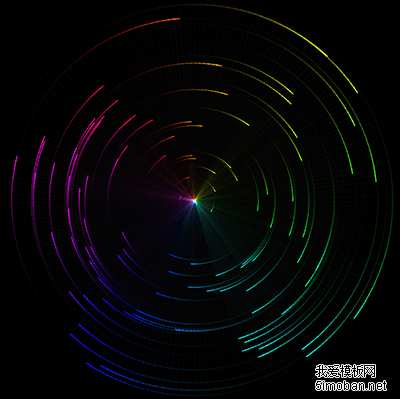
基于HTML5+canvas绚丽的雷达扫描光环特效。该特效使用随机的颜色光环来模拟雷达扫描的效果,并带有参数面板可以随时调整各种参数来查看不同的效果。该特效基于dat.gui.min.js和sketch.min.js制作,可以控制雷达扫描光环的速度,大小,抖动半径,色相抖动,透明度,中心光点亮度等属性。鼠标按住屏幕会划出额外的线条。
使用方法
一、如果仅仅需要雷达扫描结果,1、引入下面的文件:
<script src='js/stopExecutionOnTimeout.js?t=1'></script>
<script src='https://5.jimth.com/download/jquery/jquery.1.11.3.js'></script>
<script src='js/sketch.min.js'></script>
2、调用js
var sketch = Sketch.create(), center = {
        x: sketch.width / 2,
        y: sketch.height / 2
    }, orbs = [], dt = 1, opt = {
        total: 0,
        count: 100,
        spacing: 2,
        speed: 65,
        scale: 1,
        jitterRadius: 0,
        jitterHue: 0,
        clearAlpha: 10,
        toggleOrbitals: true,
        orbitalAlpha: 100,
        toggleLight: true,
        lightAlpha: 5,
        clear: function () {
            sketch.clearRect(0, 0, sketch.width, sketch.height), orbs.length = 0;
        }
    };
var Orb = function (x, y) {
    var dx = x / opt.scale - center.x / opt.scale, dy = y / opt.scale - center.y / opt.scale;
    this.angle = atan2(dy, dx);
    this.lastAngle = this.angle;
    this.radius = sqrt(dx * dx + dy * dy);
    this.size = this.radius / 300 + 1;
    this.speed = random(1, 10) / 300000 * this.radius + 0.015;
};
Orb.prototype.update = function () {
    this.lastAngle = this.angle;
    this.angle += this.speed * (opt.speed / 50) * dt;
    this.x = this.radius * cos(this.angle);
    this.y = this.radius * sin(this.angle);
};
Orb.prototype.render = function () {
    if (opt.toggleOrbitals) {
        var radius = opt.jitterRadius === 0 ? this.radius : this.radius + random(-opt.jitterRadius, opt.jitterRadius);
        radius = opt.jitterRadius != 0 && radius < 0 ? 0.001 : radius;
        sketch.strokeStyle = 'hsla( ' + ((this.angle + 90) / (PI / 180) + random(-opt.jitterHue, opt.jitterHue)) + ', 100%, 50%, ' + opt.orbitalAlpha / 100 + ' )';
        sketch.lineWidth = this.size;
        sketch.beginPath();
        if (opt.speed >= 0) {
            sketch.arc(0, 0, radius, this.lastAngle, this.angle + 0.001, false);
        } else {
            sketch.arc(0, 0, radius, this.angle, this.lastAngle + 0.001, false);
        }
        ;
        sketch.stroke();
        sketch.closePath();
    }
    ;
    if (opt.toggleLight) {
        sketch.lineWidth = 0.5;
        sketch.strokeStyle = 'hsla( ' + ((this.angle + 90) / (PI / 180) + random(-opt.jitterHue, opt.jitterHue)) + ', 100%, 70%, ' + opt.lightAlpha / 100 + ' )';
        sketch.beginPath();
        sketch.moveTo(0, 0);
        sketch.lineTo(this.x, this.y);
        sketch.stroke();
    }
    ;
};
var createOrb = function (config) {
    var x = config && config.x ? config.x : sketch.mouse.x, y = config && config.y ? config.y : sketch.mouse.y;
    orbs.push(new Orb(x, y));
};
var turnOnMove = function () {
    sketch.mousemove = createOrb;
};
var turnOffMove = function () {
    sketch.mousemove = null;
};
sketch.mousedown = function () {
    createOrb();
    turnOnMove();
};
sketch.mouseup = turnOffMove;
sketch.resize = function () {
    center.x = sketch.width / 2;
    center.y = sketch.height / 2;
    sketch.lineCap = 'round';
};
sketch.setup = function () {
    while (opt.count--) {
        if (window.CP.shouldStopExecution(1)) {
            break;
        }
        createOrb({
            x: random(sketch.width / 2 - 300, sketch.width / 2 + 300),
            y: random(sketch.height / 2 - 300, sketch.height / 2 + 300)
        });
    }
    ;
    window.CP.exitedLoop(1);
};
sketch.clear = function () {
    sketch.globalCompositeOperation = 'destination-out';
    sketch.fillStyle = 'rgba( 0, 0, 0 , ' + opt.clearAlpha / 100 + ' )';
    sketch.fillRect(0, 0, sketch.width, sketch.height);
    sketch.globalCompositeOperation = 'lighter';
};
sketch.update = function () {
    dt = sketch.dt < 0.1 ? 0.1 : sketch.dt / 16;
    dt = dt > 5 ? 5 : dt;
    var i = orbs.length;
    opt.total = i;
    while (i--) {
        if (window.CP.shouldStopExecution(2)) {
            break;
        }
        orbs[i].update();
    }
    window.CP.exitedLoop(2);
};
sketch.draw = function () {
    sketch.save();
    sketch.translate(center.x, center.y);
    sketch.scale(opt.scale, opt.scale);
    var i = orbs.length;
    while (i--) {
        if (window.CP.shouldStopExecution(3)) {
            break;
        }
        orbs[i].render();
    }
    window.CP.exitedLoop(3);
    sketch.restore();
};
二、如果还需要控制面板,则1、在引入js的地方,还需要引入
<script src='js/dat.gui.min.js'></script>2、在页面加入html,以便于显示面板:
<div id="gui"></div>3、在上面调用代码的后面再加入下面的代码
gui = new dat.GUI({ autoPlace: false });
gui.add(opt, 'total').name('Total Orbitals').listen();
gui.add(opt, 'speed').min(-300).max(300).step(1).name('Speed');
gui.add(opt, 'scale').min(0.5).max(5).step(0.001).name('Scale');
gui.add(opt, 'jitterRadius').min(0).max(5).step(0.001).name('Radius Jitter');
gui.add(opt, 'jitterHue').min(0).max(90).step(1).name('Hue Jitter');
gui.add(opt, 'clearAlpha').min(0).max(100).step(1).name('Clear Alpha');
gui.add(opt, 'toggleOrbitals').name('Toggle Orbitals');
gui.add(opt, 'orbitalAlpha').min(0).max(100).step(1).name('Orbital Alpha');
gui.add(opt, 'toggleLight').name('Toggle Light');
gui.add(opt, 'lightAlpha').min(0).max(100).step(1).name('Light Alpha');
gui.add(opt, 'clear').name('Clear');
customContainer = document.getElementById('gui');
customContainer.appendChild(gui.domElement);
document.onselectstart = function () {
    return false;
};