
特效介绍
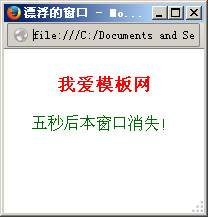
JS弹出窗口,预览时,会自动弹出一个窗口,或者点击按钮也可以触发弹窗,五秒后,弹窗会自动消失。如果您的浏览器阻止了弹窗,效果可能看不出来。运行下面的代码查看效果:
提示:您可以先修改部分代码再运行
使用方法
1、在head引入下面的js:
<SCRIPT>
var flyingwin;
var popupwidth=200;
var popupheight=150;
var marginright;
var windowcenter;
var i_top=200;
var i_left=-popupwidth-50;
var step=40;
var timer;
var waitingtime=5000;
var pause=20;
function showWindow() {
	flyingwin = window.open("", "flyingwin", "toolbar=no,width="+popupwidth+",height="+popupheight+",top=100,left="+(-popupwidth)+"");
	flyingwin.document.open();
	flyingwin.document.write("<html><title>漂浮的窗口</title><body text='#006600'><p align='center'><br><font size='+1' color=red><b>我爱模板网</b></font><br><br>五秒后本窗口消失!</p><\/body><\/html>");
	flyingwin.document.close();
	if (document.all) {
		marginright = screen.width+50
	}
	if (document.layers) {
		marginright = screen.width+50
	}
	windowcenter=Math.floor(marginright/2)-Math.floor(popupwidth/2)
	movewindow()
}
function movewindow() {
	if (i_left<=windowcenter) {
		flyingwin.moveTo(i_left,i_top)
		i_left+=step
		timer= setTimeout("movewindow()",pause)
	}
	else {
		clearTimeout(timer)
		timer= setTimeout("movewindow2()",waitingtime)
	}
}
function movewindow2() {
	if (i_left<=marginright) {
		flyingwin.moveTo(i_left,i_top)
		i_left+=step
		timer= setTimeout("movewindow2()",pause)
	}
	else {
		clearTimeout(timer)
		flyingwin.close()
	}
}
</SCRIPT>
2、如果想载入页面就弹窗,请在body的任意地方加入下面的调用代码:
<script>
onload=showWindow();
</script>
3、如果想点击触发的话,可以再被点击的对象上加入下面的属性:
onclick="showWindow()"