
特效介绍
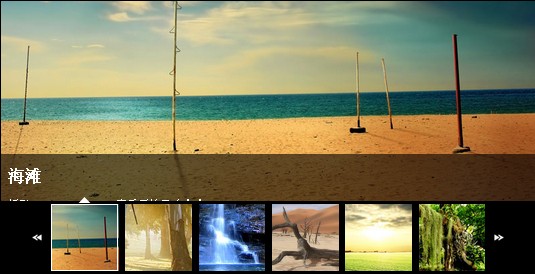
基于jQuery GalleryView插件的图片集特效代码下载。GalleryView可以用来显示一个幻灯片功能的照相馆。上一帧就会跳转到该照片,每张照片覆盖的标题点击包含了完整的图像链接。这个图片集采用默认插件选项,设置只有尺寸面板和幻灯片框架。
使用方法
1、在头部引入下面的代码<script type="text/javascript" src="js/jquery-1.3.2.min.js"></script>
<script type="text/javascript" src="js/jquery.easing.1.3.js"></script>
<script type="text/javascript" src="js/jquery.galleryview-1.1.js"></script>
<script type="text/javascript" src="js/jquery.timers-1.1.2.js"></script>
<script type="text/javascript">
$(document).ready(function(){
$('#photos').galleryView({
panel_width: 800,
panel_height: 300,
frame_width: 100,
frame_height: 100
});
});
</script>
2、在html文档的body中加入下面的代码:<div id="photos" class="galleryview">
<div class="panel">
<img src="images/01.jpg" />
<div class="panel-overlay">
<h2>阳光与大海</h2>
<p>摄影:<a href="https://5.jimth.com" target="_blank">tomharry</a>. 查看原始尺寸<a href="https://5.jimth.com" target="_blank">点击</a>.</p>
</div>
</div>
<div class="panel">
<img src="images/02.jpg" />
<div class="panel-overlay">
<h2>原始森林</h2>
<p>摄影:<a href="https://5.jimth.com" target="_blank">emsago</a>. 查看原始尺寸<a href="https://5.jimth.com" target="_blank">点击</a>.</p>
</div>
</div>
<div class="panel">
<img src="images/03.jpg" />
<div class="panel-overlay">
<h2>蜗牛</h2>
<p>摄影:<a href="https://5.jimth.com" target="_blank">baines</a>. 查看原始尺寸<a href="https://5.jimth.com" target="_blank">点击</a>.</p>
</div>
</div>
<div class="panel">
<img src="images/04.jpg" />
<div class="panel-overlay">
<h2>春意盎然</h2>
<p>摄影:<a href="https://5.jimth.com" target="_blank">jazza</a>. 查看原始尺寸<a href="https://5.jimth.com" target="_blank">点击</a>.</p>
</div>
</div>
<div class="panel">
<img src="images/06.jpg" />
<div class="panel-overlay">
<h2>海滩</h2>
<p>摄影:<a href="https://5.jimth.com" target="_blank">sgursozlu</a>. 查看原始尺寸<a href="https://5.jimth.com" target="_blank">点击</a>.</p>
</div>
</div>
<div class="panel">
<img src="images/05.jpg" />
<div class="panel-overlay">
<h2>老树阳光</h2>
<p>摄影:<a href="https://5.jimth.com" target="_blank">a_glitch</a>. 查看原始尺寸<a href="https://5.jimth.com" target="_blank">点击</a>.</p>
</div>
</div>
<div class="panel">
<img src="images/07.jpg" />
<div class="panel-overlay">
<h2>瀑布</h2>
<p>摄影:<a href="https://5.jimth.com" target="_blank">thesaint</a>. 查看原始尺寸<a href="https://5.jimth.com" target="_blank">点击</a>.</p>
</div>
</div>
<div class="panel">
<img src="images/08.jpg" />
<div class="panel-overlay">
<h2>毫无生气</h2>
<p>摄影:<a href="https://5.jimth.com" target="_blank">djkmart</a>. 查看原始尺寸<a href="https://5.jimth.com" target="_blank">点击</a>.</p>
</div>
</div>
<ul class="filmstrip">
<li><img src="images/frame-01.jpg" alt="Effet du soleil" title="Effet du soleil" /></li>
<li><img src="images/frame-02.jpg" alt="Eden" title="Eden" /></li>
<li><img src="images/frame-03.jpg" alt="Snail on the Corn" title="Snail on the Corn" /></li>
<li><img src="images/frame-04.jpg" alt="Flowers" title="Flowers" /></li>
<li><img src="images/frame-06.jpg" alt="Alone Beach" title="Alone Beach" /></li>
<li><img src="images/frame-05.jpg" alt="Sunrise Trees" title="Sunrise Trees" /></li>
<li><img src="images/frame-07.jpg" alt="Waterfall" title="Waterfall" /></li>
<li><img src="images/frame-08.jpg" alt="Death Valley" title="Death Valley" /></li>
</ul>
</div>
调用代码参数:panel_width: 800, 图片集高度
panel_height: 300, 图片集宽度
frame_width: 100, 缩略图高度
frame_height: 100 缩略图宽度