
特效介绍

使用方法
1、引入swf.js、jquery-1.7.2.min.js2、把以下代码拷贝到你想引用的地方
<div class="loop_flash">
<SCRIPT language=javascript1.1>
(function($){
    var imag=[];
    var link=[];
    var text=[];

      imag[0]=encodeURIComponent("images/11.png");
    link[0]=encodeURIComponent("https://5.jimth.com");
    text[0]="";
      imag[1]=encodeURIComponent("images/22.png");
    link[1]=encodeURIComponent("https://5.jimth.com");
    text[1]="";
      imag[2]=encodeURIComponent("images/33.png");
    link[2]=encodeURIComponent("https://5.jimth.com");
    text[2]="";
      imag[3]=encodeURIComponent("images/44.png");
    link[3]=encodeURIComponent("https://5.jimth.com");
    text[3]="";

    if(imag.length < 4){
        for(var i=imag.length;i<4;i++){
              imag[i]="images/ad.jpg";
            link[i]=encodeURIComponent("/");
            text[i]="";
        }
    }
     var pic_width=1020;
    var pic_height=380;
    var stop_time=5000;
    makeSWF('FrontPageFocusShower','images/focus1.swf',{
        FlashVars : 'pics='+imag.join('|')+'&links='+link.join('|')+'&texts='+text.join('|')+'&stop_time='+stop_time+'',
        wmode: 'opaque',
        scale: 'noScale',
        quality: 'high',
        width : pic_width,
        height : pic_height
    });
})($);
</SCRIPT>
</div>
3、修改参数:
pic_width=1020; 修改图片宽度
pic_height=380; 修改图片高度
stop_time=5000; 修改图片轮播时间
4、修改flash源文件:
1)建议用Adobe Flash CS5.5 打开压缩包里的focus.fla文件。
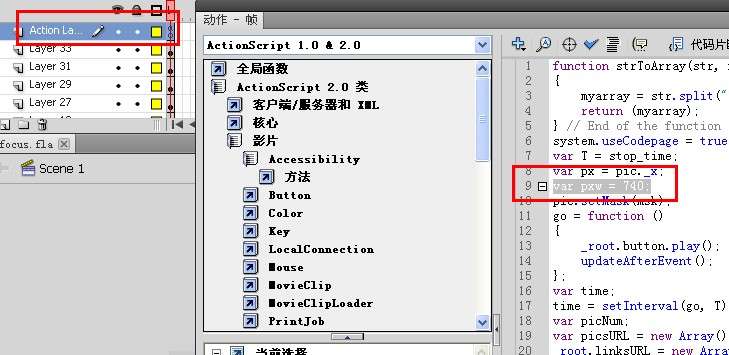
2)选中“Action Layer”图层,按F9打开代码窗口,找到“var pxw = 1020;”,后面的1020为轮播宽度,改成你想要的宽度,然后关闭该窗口。如下图:
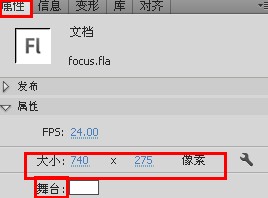
3)点击空白处,打开属性面板,修改舞台的高宽尺寸为你想修改的尺寸。
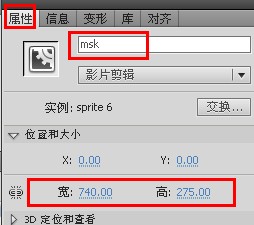
4)选中“Layer 11”图层,点击舞台,修改该实例名称为“msk”的影片剪辑的高宽尺寸。
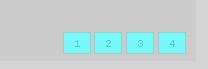
5)由于更改了场景的大小,导致1~4四个数字按钮位置不正确,按住shift键,依次选中这四个按钮,调整到你想要的位置,例如场景左下角。
6)ctrl+enter重新发布flash,生成focus1.swf即可。