
在echarts中map的放大缩小与重置,具体实现的效果是这样的:
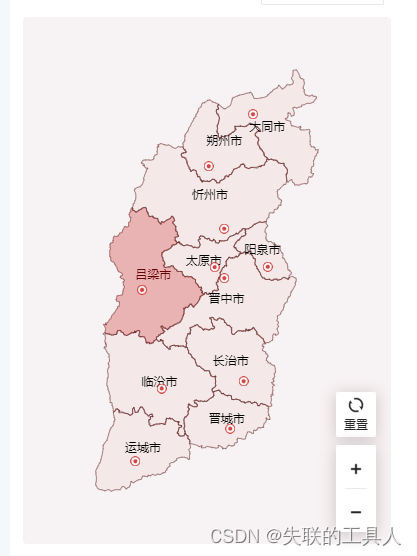
首先先写一个简单的地图出来:
this.myChart = echarts.init(this.$refs.mapEcharts);
echarts.registerMap('SHANXI', this.geoJson);
this.myChart.setOption(
{
  geo: {
    map: 'SHANXI',
    roam: false,
    z: 0,
    label: {
      show: true,
      color: '#000',
      fontSize: 12,
      fontWeight: '400',
    },
    itemStyle: {
      normal: {
        areaColor: 'rgba(202, 31, 29, 0.05)',
        borderColor: '#5B1817',
      },
      emphasis: {
        areaColor: 'rgba(202, 31, 29, 0.30)',
      },
    },
  },
  series: [
    {
      name: '产业集群',
      type: 'scatter',
      coordinateSystem: 'geo',
      symbol:
        'image://data:image/png;base64,#####ErkJggg==',
      data: dataList,
      z: 9999,
    },
  ],
},
true,
);
对应的操作方法:
//重置
toReset() {
  this.roamMap(2);
},
//放大
toBig() {
  this.roamMap(0);
},
//缩小
toSmall() {
  this.roamMap(1);
},
实现的方法(通过修改对应的zoom来实现):
roamMap(flag) {
  const that = this;
  const currentZoom = this.myChart._api.getOption().geo[0].zoom; // 当前的缩放比例
  let increaseAmplitude = 1.2; // 点击按钮每次 放大/缩小 比例   默认放大倍数
  if (flag === 1) {
    increaseAmplitude = 0.8;   //缩小倍数
  }
  if (flag == 2) {
    increaseAmplitude = 0;   //重置
  }
  that.myChart.setOption({
    geo: {
      zoom: currentZoom * increaseAmplitude || 1,
    },
  });
},