自定义弹窗(CustomDialog)可用于广告、中奖、警告、软件更新等与用户交互响应操作。开发者可以通过CustomDialogController类显示自定义弹窗。
创建自定义弹窗
1、使用@CustomDialog装饰器装饰自定义弹窗。
2、@CustomDialog装饰器用于装饰自定义弹框,此装饰器内进行自定义内容(也就是弹框内容)。
@CustomDialog
struct CustomDialogExample {
  controller: CustomDialogController
  build() {
    Column() {
      Text('我是内容')
      .fontSize(20)
      .margin({ top: 10, bottom: 10 })
    }
  }
}
3、创建构造器,与装饰器呼应相连。
dialogController: CustomDialogController = new CustomDialogController({
    builder: CustomDialogExample({}),
})
4、点击与onClick事件绑定的组件使弹窗弹出
Flex({justifyContent:FlexAlign.Center}){
  Button('click me')
    .onClick(() => {
      this.dialogController.open()
    })
}.width('100%')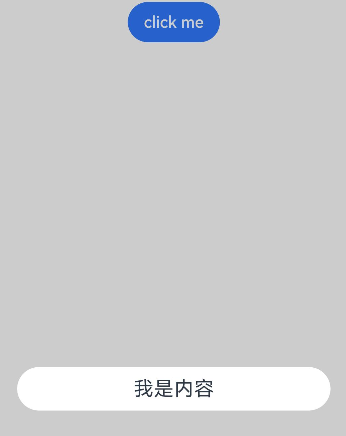
弹窗的交互
弹窗可用于数据交互,完成用户一系列响应操作。
1、在@CustomDialog装饰器内添加按钮操作,同时添加数据函数的创建。
@CustomDialog
struct CustomDialogExample {
  controller: CustomDialogController
  cancel: () => void
  confirm: () => void
  build() {
    Column() {
      Text('我是内容').fontSize(20).margin({ top: 10, bottom: 10 })
      Flex({ justifyContent: FlexAlign.SpaceAround }) {
        Button('cancel')
          .onClick(() => {
            this.controller.close()
            this.cancel()
          }).backgroundColor(0xffffff).fontColor(Color.Black)
        Button('confirm')
          .onClick(() => {
            this.controller.close()
            this.confirm()
          }).backgroundColor(0xffffff).fontColor(Color.Red)
      }.margin({ bottom: 10 })
    }
  }
}
2、页面内需要在构造器内进行接收,同时创建相应的函数操作。
dialogController: CustomDialogController = new CustomDialogController({
  builder: CustomDialogExample({
    cancel: this.onCancel,
    confirm: this.onAccept,
  }),
  alignment: DialogAlignment.Default,  // 可设置dialog的对齐方式,设定显示在底部或中间等,默认为底部显示
})
onCancel() {
  console.info('Callback when the first button is clicked')
}
onAccept() {
  console.info('Callback when the second button is clicked')
}
完整示例
// xxx.ets
@CustomDialog
struct CustomDialogExample {
  controller: CustomDialogController
  cancel: () => void
  confirm: () => void
  build() {
    Column() {
      Text('我是内容').fontSize(20).margin({ top: 10, bottom: 10 })
      Flex({ justifyContent: FlexAlign.SpaceAround }) {
        Button('cancel')
          .onClick(() => {
            this.controller.close()
            this.cancel()
          }).backgroundColor(0xffffff).fontColor(Color.Black)
        Button('confirm')
          .onClick(() => {
            this.controller.close()
            this.confirm()
          }).backgroundColor(0xffffff).fontColor(Color.Red)
      }.margin({ bottom: 10 })
    }
  }
}
// 页面调用
@Entry
@Component
struct DialogExample {
  dialogController: CustomDialogController = new CustomDialogController({
    builder: CustomDialogExample({
      cancel: this.onCancel,
      confirm: this.onAccept,
    }),
    alignment: DialogAlignment.Default,  // 可设置dialog的对齐方式,设定显示在底部或中间等,默认为底部显示
  })
  onCancel() {
    console.info('Callback when the first button is clicked')
  }
  onAccept() {
    console.info('Callback when the second button is clicked')
  }
  build() {
    Flex({ justifyContent: FlexAlign.Center }) {
      Button('click me')
        .onClick(() => {
          this.dialogController.open()
        })
    }.width('100%')
  }
}