
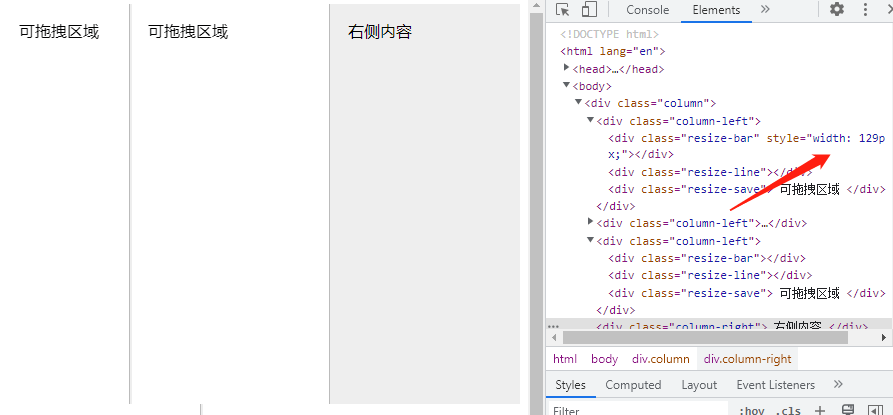
以往,我们实现拖拽修改容器的宽高,都是利用js+鼠标事件来实现,麻烦不说,控制的不好还容易出现问题,这里,利用css的resize,可以更加高效且简单的就实现了拖拽改变宽度的效果,如下:
css代码:
  .column {
    overflow: hidden;
  }
  .column-left {
    height: 400px;
    background-color: #fff;
    position: relative;
    float: left;
  }
  .column-right {
    height: 400px;
    padding: 16px;
    background-color: #eee;
    box-sizing: border-box;
    overflow: hidden;
  }
  .resize-save {
    position: absolute;
    top: 0;
    right: 5px;
    bottom: 0;
    left: 0;
    padding: 16px;
    overflow-x: hidden;
  }
  .resize-bar {
    width: 200px;
    height: inherit;
    resize: horizontal;
    cursor: ew-resize;
    cursor: col-resize;
    opacity: 0;
    overflow: scroll;
  }
  /* 拖拽线 */
  .resize-line {
    position: absolute;
    right: 0;
    top: 0;
    bottom: 0;
    border-right: 2px solid #eee;
    border-left: 1px solid #bbb;
    pointer-events: none;
  }
  .resize-bar:hover~.resize-line,
  .resize-bar:active~.resize-line {
    border-left: 1px dashed skyblue;
  }
  .resize-bar::-webkit-scrollbar {
    width: 200px;
    height: inherit;
  }
  /* Firefox只有下面一小块区域可以拉伸 */
  @supports (-moz-user-select: none) {
    .resize-bar:hover~.resize-line,
    .resize-bar:active~.resize-line {
      border-left: 1px solid #bbb;
    }
    .resize-bar:hover~.resize-line::after,
    .resize-bar:active~.resize-line::after {
      content: '';
      position: absolute;
      width: 16px;
      height: 16px;
      bottom: 0;
      right: -8px;
      background: url(./resize.svg);
      background-size: 100% 100%;
    }
  }
html代码:
<div class="column">
  <div class="column-left">
    <div class="resize-bar"></div>
    <div class="resize-line"></div>
    <div class="resize-save">
      可拖拽区域
    </div>
  </div>
  <div class="column-left">
    <div class="resize-bar"></div>
    <div class="resize-line"></div>
    <div class="resize-save">
      可拖拽区域
    </div>
  </div>
  <div class="column-left">
    <div class="resize-bar"></div>
    <div class="resize-line"></div>
    <div class="resize-save">
      可拖拽区域
    </div>
  </div>
  <div class="column-right">
    右侧内容
  </div>
</div>