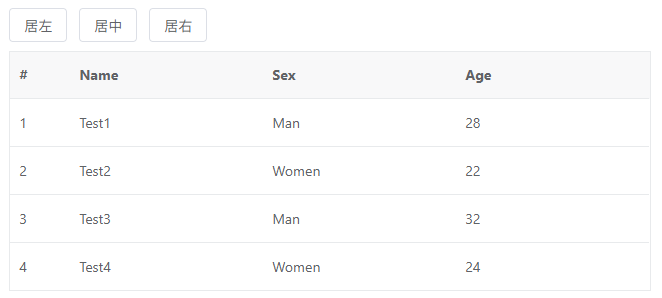
特效介绍
我爱模板网在做一个基于vue3+element-plus的项目时,数据高达四五十万,在使用el-table展示数据时,客户要求分页大小改成100、500、1000、2000、5000、10000的切换模式,当分页达到2000时,el-table渲染要花上四五秒,达到5000基本上就会经常卡死。
百度了一番,返现vxe-table貌似口碑不错,最大支持渲染五万列,三十万行,也不怎么卡顿,立马换上,发现还真不错。
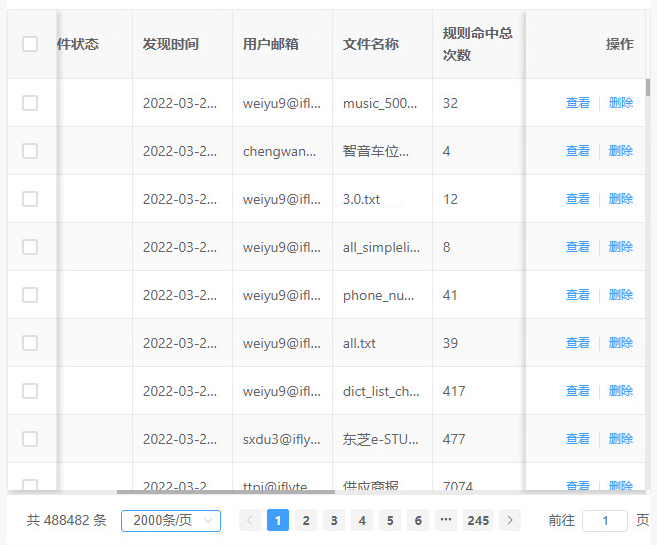
它在渲染大数据时,采用的是虚拟渲染,只渲染视窗内的内容,而且,它的很多api,如sort、filter等与el-table几乎差不多。使用起来非常方便。如下图,进五十万的数据,渲染了2000行:
使用方法
1、安装
npm install xe-utils vxe-table@next
2、在main.js中引用
import { App, createApp } = 'vue'
import 'xe-utils'
import VXETable from 'vxe-table'
import 'vxe-table/lib/style.css'
function useTable (app: App) {
app.use(VXETable)
// 给 vue 实例挂载内部对象,例如:
// app.config.globalProperties.$XModal = VXETable.modal
// app.config.globalProperties.$XPrint = VXETable.print
// app.config.globalProperties.$XSaveFile = VXETable.saveFile
// app.config.globalProperties.$XReadFile = VXETable.readFile
}
createApp(App).use(useTable).mount('#app')
全局参数:
 import VXETable from 'vxe-table'
VXETable.setup({
// size: null, // 全局尺寸
// zIndex: 999, // 全局 zIndex 起始值,如果项目的的 z-index 样式值过大时就需要跟随设置更大,避免被遮挡
// version: 0, // 版本号,对于某些带数据缓存的功能有用到,上升版本号可以用于重置数据
// table: {
//   showHeader: true,
//   keepSource: false,
//   showOverflow: null,
//   showHeaderOverflow: null,
//   showFooterOverflow: null,
//   size: null,
//   autoResize: false,
//   stripe: false,
//   border: false,
//   round: false,
//   emptyText: '暂无数据',
//   rowConfig: {
//     keyField: '_X_ROW_KEY' // 行数据的唯一主键字段名
//   },
//   radioConfig: {
//     trigger: 'default'
//   },
//   checkboxConfig: {
//     strict: false,
//     highlight: false,
//     range: false,
//     trigger: 'default'
//   },
//   sortConfig: {
//     remote: false,
//     trigger: 'default',
//     orders: ['asc', 'desc', null],
//     sortMethod: null
//   },
//   filterConfig: {
//     remote: false,
//     filterMethod: null
//   },
//   expandConfig: {
//     trigger: 'default',
//     showIcon: true
//   },
//   treeConfig: {
//     rowField: 'id',
//     parentField: 'parentId',
//     children: 'children',
//     hasChild: 'hasChild',
//     mapChildren: '_X_ROW_CHILD',
//     indent: 20,
//     showIcon: true
//   },
//   tooltipConfig: {
//     enterable: true
//   },
//   menuConfig: {
//     visibleMethod () {}
//   },
//   editConfig: {
//     mode: 'cell',
//     showAsterisk: true
//   },
//   importConfig: {
//     modes: ['insert', 'covering']
//   },
//   exportConfig: {
//     modes: ['current', 'selected']
//   },
//   customConfig: {
//    storage: false
//   },
//   scrollX: {
//     gt: 60
//   },
//   scrollY: {
//     gt: 100
//   }
// },
// grid: {
//   size: null,
//   zoomConfig: {
//     escRestore: true
//   },
//   pagerConfig: {
//     perfect: false
//   },
//   toolbarConfig: {
//     perfect: false
//   },
//   proxyConfig: {
//     autoLoad: true,
//     message: true,
//     props: {
//       list: null, // 用于列表,读取响应数据
//       result: 'result', // 用于分页,读取响应数据
//       total: 'page.total' // 用于分页,读取总条数
//     }
//     beforeItem: null,
//     beforeColumn: null,
//     beforeQuery: null,
//     afterQuery: null,
//     beforeDelete: null,
//     afterDelete: null,
//     beforeSave: null,
//     afterSave: null
//   }
// },
// pager: {
//   size: null,
//   autoHidden: false,
//   perfect: true,
//   pageSize: 10,
//   pagerCount: 7,
//   pageSizes: [10, 15, 20, 50, 100],
//   layouts: ['PrevJump', 'PrevPage', 'Jump', 'PageCount', 'NextPage', 'NextJump', 'Sizes', 'Total']
// },
// form: {
//   preventSubmit: false
//   size: null,
//   colon: false,
//   validConfig: {
//     autoPos: true
//   },
//   tooltipConfig: {
//     enterable: true
//   },
//   titleAsterisk: true
// },
// input: {
//   size: null,
//   transfer: false
//   parseFormat: 'yyyy-MM-dd HH:mm:ss.SSS',
//   labelFormat: '',
//   valueFormat: '',
//   startDay: 1,
//   digits: 2,
//   controls: true
// },
// textarea: {
//   size: null
//   autosize: {
//     minRows: 1,
//     maxRows: 10
//   }
// },
// select: {
//   size: null,
//   transfer: false,
//   optionConfig: {
//     keyField: '_X_OPTION_KEY' // 选项数据的唯一主键字段名
//   },
//   multiCharOverflow: 8
// },
// toolbar: {
//   size: null,
//   import: {
//     mode: 'covering'
//   },
//   export: {
//     types: ['csv', 'html', 'xml', 'txt']
//   },
//   custom: {
//     isFooter: true
//   },
//   buttons: [],
//   tools: []
// },
// button: {
//   size: null,
//   transfer: false
// },
// radio: {
//   size: null
// },
// checkbox: {
//   size: null
// },
// switch: {
//   size: null
// },
// modal: {
//   // size: null,
//   minWidth: 340,
//   minHeight: 200,
//   lockView: true,
//   mask: true,
//   duration: 3000,
//   marginSize: 0,
//   dblclickZoom: true,
//   showTitleOverflow: true
//   storage: false
// },
// list: {
//   scrollY: {
//     gt: 100
//   }
// }
})
3、页面中使用:
html
居左 居中 居右
js
import { defineComponent, ref } from 'vue'
export default defineComponent({
  setup () {
    const allAlign = ref(null)
    const tableData1 = ref([
      { id: 10001, name: 'Test1', role: 'Develop', sex: 'Man', age: 28, address: 'test abc' },
      { id: 10002, name: 'Test2', role: 'Test', sex: 'Women', age: 22, address: 'Guangzhou' },
      { id: 10003, name: 'Test3', role: 'PM', sex: 'Man', age: 32, address: 'Shanghai' },
      { id: 10004, name: 'Test4', role: 'Designer', sex: 'Women', age: 24, address: 'Shanghai' }
    ])
    return {
      allAlign,
      tableData1
    }
  }
})
更多用法见官网:https://vxetable.cn/v4/#/table/base/basic
最终效果图如下: