
特效介绍
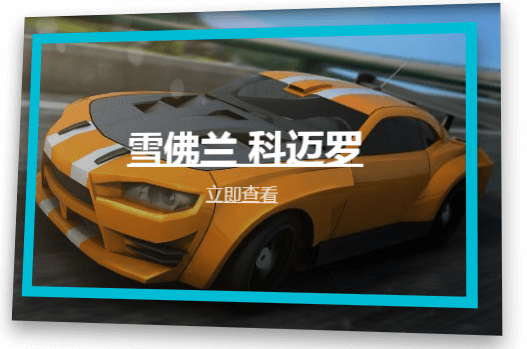
jquery.hover3d.js是一款效果超酷的鼠标滑过图片3D视差效果。当鼠标滑过图片的不同位置,图片会向鼠标的位置倾斜,鼠标下的光源会比周围亮,图片上的不同层,会出现错位的效果,立体感、层次感和视差效果就出来了。
hover3d.js插件的github地址为:https://github.com/ariona/hover3d
使用方法
1、您可以使用下面写好的css和html结构:css和html
<style type="text/css">
 .project {
 margin:50px auto;
 width:500px;
 }

 .project-list:after {
 content: " ";
 display: block;
 clear: both;
 }

 .project__image {
 display: block;
 position: relative;
 }

 .project__image img {
 width: 100%;
 max-width: 100%;
 display: block;
 }

 .project__image:after {
 content: " ";
 width: 100%;
 height: 100%;
 position: absolute;
 left: 0;
 top: 0;
 background: linear-gradient(rgba(0, 0, 0, 0.1), rgba(0, 0, 0, 0.4));
 transition: opacity .3s ease;
 opacity: 0;
 }

 .project__card {
 position: relative;
 will-change: transform;
 transition: box-shadow .3s ease;
 box-shadow: 0 10px 30px transparent;
 }

 .project__card.hover-in {
 transition: -webkit-transform .2s ease-out;
 transition: transform .2s ease-out;
 transition: transform .2s ease-out, -webkit-transform .2s ease-out;
 }

 .project__card.hover-out {
 transition: -webkit-transform .2s ease-in;
 transition: transform .2s ease-in;
 transition: transform .2s ease-in, -webkit-transform .2s ease-in;
 }

 .project:hover .project__card {
 box-shadow: 0 10px 30px rgba(0, 0, 0, 0.4);
 }

 .project:hover .project__image:after {
 opacity: 1;
 }

 .project:hover .project__detail {
 border-width: 10px;
 box-shadow: 0 10px 30px rgba(0, 0, 0, 0.4);
 }

 .project:hover .project__title, .project:hover .project__category {
 -webkit-transform: translateY(0) scale(1);
 -ms-transform: translateY(0) scale(1);
 transform: translateY(0) scale(1);
 opacity: 1;
 }

 .project__detail {
 position: absolute;
 left: 30px;
 right: 30px;
 top: 30px;
 bottom: 30px;
 display: -webkit-flex;
 display: -ms-flexbox;
 display: flex;
 -webkit-flex-direction: column;
 -ms-flex-direction: column;
 flex-direction: column;
 -webkit-justify-content: center;
 -ms-flex-pack: center;
 justify-content: center;
 text-align: center;
 pointer-events: none;
 -webkit-transform: translateZ(30px);
 transform: translateZ(30px);
 border: 0 solid #00BCD4;
 transition: border .4s ease;
 }

 .project__title {
 margin: 0 0 10px;
 font-size: 36px;
 font-weight: 700;
 transition: .4s ease;
 opacity: 0;
 -webkit-transform: translateY(40px) scale(0);
 -ms-transform: translateY(40px) scale(0);
 transform: translateY(40px) scale(0);
 will-change: transform;
 }

 .project__title a {
 color: white;
 }

 .project__category {
 opacity: 0;
 transition: .4s ease;
 transition-delay: .1s;
 -webkit-transform: translateY(40px) scale(0);
 -ms-transform: translateY(40px) scale(0);
 transform: translateY(40px) scale(0);
 will-change: transform;
 }

 .project__category a {
 color: rgba(255, 255, 255, 0.8);
 font-size: 1.3em;
 }
</style>
<div class="project">
 <div class="project__card mt50 ml2">
 <a href="" class="project__image"><img src="img/car.png"></a>
 <div class="project__detail">
 <h2 class="project__title"><a href="#">雪佛兰 科迈罗</a></h2>
 <small class="project__category"><a href="https://5.jimth.com" target="_blank" title="jquery.hover3d">立即查看</a></small>
 </div>
 </div>
</div>
或者:
<style type="text/css">
 .movie {
 width:250px;
 margin: auto;
 }

 .movie-list:after {
 content: " ";
 display: block;
 clear: both;
 }

 .movie__card {
 position: relative;
 width: 250px;
 height: 370px;
 }

 .movie__card.hover-in {
 transition: .3s ease-out;
 }

 .movie__card.hover-out {
 transition: .3s ease-in;
 }

 .movie [class*="layer"] {
 position: absolute;
 left: 0;
 top: 0;
 right: 0;
 bottom: 0;
 border-radius: 10px;
 }

 .movie .layer-1 {
 background-image: url(img/deadpool-bg.png);
 background-size: cover;
 }

 .movie .layer-2 {
 background-image: url(img/deadpool.png);
 background-size: cover;
 -webkit-transform: translateZ(30px);
 transform: translateZ(30px);
 }

 .movie .layer-3 {
 background-image: url(img/deadpool-title.png);
 background-size: cover;
 -webkit-transform: translateZ(50px);
 transform: translateZ(50px);
 }

 .movie .shine {
 border-radius: 10px;
 }
</style>
<div class="movie">
 <div class="movie__card">
 <div class="layer-1"></div>
 <div class="layer-2"></div>
 <div class="layer-3"></div>
 </div>
</div>
或者最简单的,不需要任何css:
<div class="wrap">
    <div class="inner">
        <!-- 这里面放内容 -->
    </div>
</div>
该特效不需要特别的CSS样式,你可以指定自己的CSS样式。但是你可以为鼠标滑入和滑出图片时添加下面的辅助class类。
.hover-in{
    transition: .3s ease-out;
}
.hover-out{
    transition: .3s ease-in;
}
2、引入js文件:
<script src="jquery.js"></script>
<script src="jquery.hover3d.js"></script>
3、初始化插件:
$(".project").hover3d({
    selector: ".project__card"
});
4、配置参数:
| 参数 | 类型 | 默认值 | 描述 |
| selector | string | null | 3D卡片的选择器元素 |
| perspective | integer | 1000 | 3D透视的深度 |
| sensitivity | integer | 20 | 鼠标移动的灵敏度,数值越大越不灵敏 |
| invert | boolean | false | 默认行为是元素会跟随鼠标,就像元素一直面向鼠标 |
| hoverInClass | string | hover-in | 鼠标滑入时的辅助class类,会在300毫秒后移除 |
| hoverOutClass | string | hover-out | 鼠标滑出时的辅助class类,会在300毫秒后移除 |
| hoverClass | string | hover-3d | 鼠标滑过图片时的辅助类 |