
特效介绍
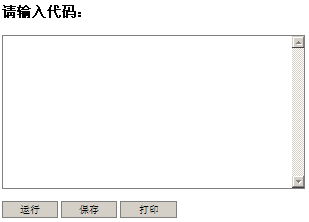
js运行代码插件,在输入框输入代码,点击下面的运行按钮可以运行里面的代码,并且支持保存代码和打印代码,但这两个功能不兼容火狐。运行代码功能兼容主流浏览器。
使用方法
1、在head区引入下面的代码<style>
#container #code{
width:400px;
height:200px;
resize:none;
background:none;
border:1px solid gray;
}
#container button ,#container .btn{
border:1px solid gray;
cursor:pointer;
padding:0px;
width:75px;
height:23px;
}
#container button:hover,#container .btn:hover{
}
</style>
<script type="text/javascript">
function Coder (id) {
this.id = id;
this.$ = function(id) {
return document.getElementById(id);
}
this.runcode = function() {
var codeWin = window.open("about:blank","_blank")
codeWin.document.writeln(this.obj.value);
return codeWin;
}
this.savecode = function() {
var codeWin = this.runcode();
var title = codeWin.document.title || "code" ;
codeWin.document.execCommand("SaveAs",false,title+".html");
codeWin.close();
}
this.printcode =function() {
var codeWin = this.runcode();
codeWin.document.execCommand("Print",false,"");
codeWin.close();
}
this.init=function() {
this.obj = this.$(this.id);
var context = this;
this.$("run").onclick = function() {
context.runcode();
};
this.$("save").onclick=function(){
context.savecode();
}
this.$("print").onclick=function(){
context.printcode();
}
}
}
var coder = new Coder("code");
window.onload = function() {coder.init();};
</script>
2、在body区域引入下面的代码:<h3>请输入代码:</h3>
<div id="container">
<p>
<textarea id="code">
请把代码放到这里运行-网站模板
</textarea>
</p>
<button type="button" id="run">运行</button>
<button type="button" id="save">保存</button>
<button type="button" id="print">打印</button>
</div>
注意:上面代码的“textarea”标签之间的内容最好顶格写。