
特效介绍
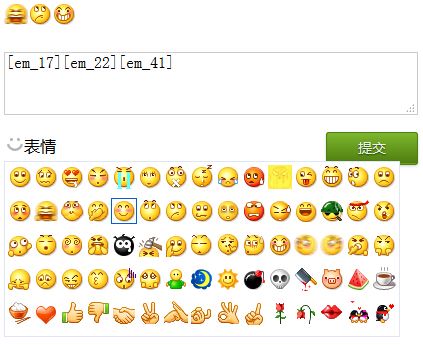
一款基于jQuery的QQ表情插件,点击输入框下面的笑脸,弹出QQ经典表情,点击表情,表情代码会显示在输入框,点击输入框下面的提交按钮,表情就会被提交并被显示。可用于博客等留言板,效果非常不错。
使用方法
1、在head引入下面的js代码:
<script type="text/javascript" src="https://5.jimth.com/tpl/js/jquery-1.8.3.min.js"></script>
<script type="text/javascript" src="jquery.qqFace.js"></script>
<script type="text/javascript">
$(function(){
$('.emotion').qqFace({
id : 'facebox', //表情盒子的ID
assign:'saytext', //输入框的ID
path:'face/' //表情存放的路径
});
$(".sub_btn").click(function(){
var str = $("#saytext").val();
$("#show").html(replace_em(str));
});
});
//查看结果
function replace_em(str){
str = str.replace(/\</g,'<');
str = str.replace(/\>/g,'>');
str = str.replace(/\n/g,'<br/>');
str = str.replace(/\[em_([0-9]*)\]/g,'<img src="face/$1.gif" border="0" />');
return str;
}
</script>
2、在head引入下面的CSS代码,当然,这不是必须的,您可以自定义样式:
<style>
.comment{width:680px; margin:20px auto; position:relative}
.comment h3{height:28px; line-height:28px}
.com_form{width:100%; position:relative}
.input{width:99%; height:60px; border:1px solid #ccc}
.com_form p{height:28px; line-height:28px; position:relative}
span.emotion{width:42px; height:20px; background:url(icon.gif) no-repeat 2px 2px; padding-left:20px; cursor:pointer}
span.emotion:hover{background-position:2px -28px}
.qqFace{margin-top:4px;background:#fff;padding:2px;border:1px #dfe6f6 solid;}
.qqFace table td{padding:0px;}
.qqFace table td img{cursor:pointer;border:1px #fff solid;}
.qqFace table td img:hover{border:1px #0066cc solid;}
#show{width:680px; margin:20px auto}
.sub_btn {
    position:absolute; right:0px; top:0;
    display: inline-block;
    zoom: 1; /* zoom and *display = ie7 hack for display:inline-block */
    *display: inline;
    vertical-align: baseline;
    margin: 0 2px;
    outline: none;
    cursor: pointer;
    text-align: center;
    font: 14px/100% Arial, Helvetica, sans-serif;
    padding: .5em 2em .55em;
    text-shadow: 0 1px 1px rgba(0,0,0,.6);
    -webkit-border-radius: 3px;
    -moz-border-radius: 3px;
    border-radius: 3px;
    -webkit-box-shadow: 0 1px 2px rgba(0,0,0,.2);
    -moz-box-shadow: 0 1px 2px rgba(0,0,0,.2);
    box-shadow: 0 1px 2px rgba(0,0,0,.2);
    color: #e8f0de;
    border: solid 1px #538312;
    background: #64991e;
    background: -webkit-gradient(linear, left top, left bottom, from(#7db72f), to(#4e7d0e));
    background: -moz-linear-gradient(top,  #7db72f,  #4e7d0e);
    filter:  progid:DXImageTransform.Microsoft.gradient(startColorstr='#7db72f', endColorstr='#4e7d0e');
}
.sub_btn:hover {
    background: #538018;
    background: -webkit-gradient(linear, left top, left bottom, from(#6b9d28), to(#436b0c));
    background: -moz-linear-gradient(top,  #6b9d28,  #436b0c);
    filter:  progid:DXImageTransform.Microsoft.gradient(startColorstr='#6b9d28', endColorstr='#436b0c');
}
</style>
3、在您的网页中,需要使用评论的地方,加入下面的代码:
<div id="show"></div>
<div class="comment">
    <div class="com_form">
        <textarea class="input" id="saytext" name="saytext"></textarea>
        <p><input type="button" class="sub_btn" value="提交"><span class="emotion">表情</span></p>
    </div>
</div>