
特效介绍
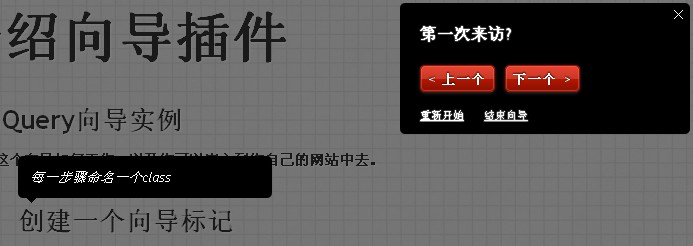
增强社交、论坛、商城用户友好性的jQuery提示和网站向导插件下载。
使用方法
1、在头部引入下面的代码<link rel="stylesheet" type="text/css" href="css/style.css" /> <link rel="stylesheet" type="text/css" href="css/jquerytour.css" /> <script src="js/cufon-yui.js" type="text/javascript"></script>2、在网站需要显示提示的地方按顺序一次加入tour_1~tour_7,当然,你可以增加更多的。增删下面的代码即可,参数详见第三步:
var config = [
    {
        "name"         : "tour_1",
        "bgcolor"    : "black",
        "color"        : "white",
        "position"    : "TL",
        "text"        : "你可以在你的应用中创建一个向导实例",
        "time"         : 5000
    },
    {
        "name"         : "tour_2",
        "bgcolor"    : "black",
        "color"        : "white",
        "text"        : "每一步骤命名一个class",
        "position"    : "BL",
        "time"         : 5000
    }
3、参数详解name: 提示栏的指定位置
bgcolor: 向导提示栏的背景颜色
color: 向导提示栏的文字颜色
text: 向导提示栏的文字
time: 如果启用自动播放,则是每个向导的停留时间
position: 向导提示栏的位置,(相对于name的位置)
TL top left
TR top right
BL bottom left
BR bottom right
LT left top
LB left bottom
RT right top
RB right bottom
T top
R right
B bottom
L left
//定义是否自动播放,默认为不自动
autoplay = false,
//timeout for the step
showtime,
//current step of the tour
step = 0,
//total number of steps
total_steps = config.length;
//加载控制器
showControls();
/*
以下为向导框设置,绑定事件
*/
$('#activatetour').live('click',startTour);
$('#canceltour').live('click',endTour);
$('#endtour').live('click',endTour);
$('#restarttour').live('click',restartTour);
$('#nextstep').live('click',nextStep);
$('#prevstep').live('click',prevStep);