
特效介绍
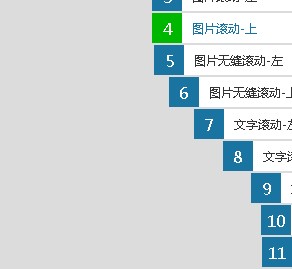
鼠标移上去有弹性的依次弹出和收回的右侧隐藏菜单jquery代码,兼容IE6+。
使用方法
第一步、在head区域引入下面的css样式和jquery库。<script type="text/javascript" src="https://5.jimth.com/download/jquery/jquery-1.8.3.min.js"></script> <link href="css/default.css" rel="stylesheet" type="text/css">第二步、在body区域引入下面的代码:
<div class="rightNav">
    <a href="https://5.jimth.com" style="right: -110px;"><em>0</em>站长素材</a>
    <a href="https://5.jimth.com" style="right: -110px;"><em>1</em>书签切换</a>
    <a href="https://5.jimth.com" style="right: -110px;"><em>2</em>幻灯片</a>
    <a href="https://5.jimth.com" style="right: -110px;"><em>3</em>图片滚动-左</a>
    <a href="https://5.jimth.com" style="right: -110px;"><em>4</em>图片滚动-上</a>
    <a href="https://5.jimth.com" style="right: -110px;"><em>5</em>图片无缝滚动-左</a>
    <a href="https://5.jimth.com" style="right: -110px;"><em>6</em>图片无缝滚动-上</a>
    <a href="https://5.jimth.com" style="right: -110px;"><em>7</em>文字滚动-左</a>
    <a href="https://5.jimth.com" style="right: -110px;"><em>8</em>文字滚动-上</a>
    <a href="https://5.jimth.com" style="right: -110px;"><em>9</em>文字无缝滚动-左</a>
    <a href="https://5.jimth.com" style="right: -110px;"><em>10</em>文字无缝滚动-上</a>
    <a href="https://5.jimth.com" style="right: -110px;"><em>11</em>其它基础效果</a>
</div>
<script type="text/javascript">
    var btb=$(".rightNav");
    var tempS;
    $(".rightNav").hover(function(){
            var thisObj = $(this);
            tempS = setTimeout(function(){
            thisObj.find("a").each(function(i){
                var tA=$(this);
                setTimeout(function(){ tA.animate({right:"0"},300);},50*i);
            });
        },200);

    },function(){
        if(tempS){ clearTimeout(tempS); }
        $(this).find("a").each(function(i){
            var tA=$(this);
            setTimeout(function(){ tA.animate({right:"-110"},300,function(){
            });},50*i);
        });
    });
    var isIE6 = !!window.ActiveXObject&&!window.XMLHttpRequest;
    if( isIE6 ){ $(window).scroll(function(){ btb.css("top", $(document).scrollTop()+100) }); }
</script>