
特效介绍
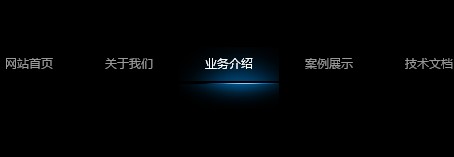
跟随鼠标滑动的非常有弹性的jquery导航特效。由于背景是png格式,而IE不支持PNG背景透明,所以效果不好,建议解决IE PNG透明问题,具体方法:IE PNG透明问题的解决方法
使用方法
使用方法:1、在head区引入相关js和css代码:
<script type="text/javascript" src="https://5.jimth.com/download/jquery/jquery-1.8.3.min.js"></script>
<script type="text/javascript" src="js/jquery.easing.min.js"></script>
<script type="text/javascript" src="js/jquery.highlight.min.js"></script>
<script type="text/ecmascript">
$(function() {
            $("#nav").lavaLamp({
                fx: "backout",
                speed: 300,
                click: function(event, menuItem) {
                    return open; //如果这里为false,点击就会无效
                }
            });
        });
</script>
<script type="text/javascript">
    <!--
    function zlm(lm,lms,lmname){
    for(var i=1;i<=lms;i++){
    if(i==lm){
    document.getElementById(lmname+i+'c').className='thisok';
    document.getElementById(lmname+i).style.display='block';
    }else{
    document.getElementById(lmname+i+'c').className='thisno';
    document.getElementById(lmname+i).style.display='none';
    }
    }
    }
    //-->
</script>
<style>
html, body, h1, h2, h3, h4, h5, h6, p, pre, blockquote, dl, dt, dd, ul, ol, li, form, fieldset, legend, input, textarea, button, th, td { margin:0; padding:0; text-indent: 0px; }
html { background-color: #000; }
:focus{ -moz-outline-style: none; }
img { border: none; padding: 0px; }
ol, ul,li { list-style: none; }
.clear {clear:both }
.left { float:left; }
.right { float:right; }
.bold { font-weight:bold; }
a,a:link,a:hover,a:visited,a:active { text-decoration:none; font-size:12px;}
a:link.bai, a:visited.bai {color:#FFFFFF; }
a:hover.bai, a:active.bai {color:#0066CC; }
a:link.red, a:visited.red {color:red; text-decoration:none; }
a:hover.red, a:active.red {color:#003399; }
a:link.blue, a:visited.blue {color:blue; }
a:hover.blue, a:active.blue {color:#003399; }
a:link.green, a:visited.green {color:green; }
a:hover.green, a:active.green {color:#003399; }
a:link.gold, a:visited.gold {color:#F1701D; font-size:14px; }
a:hover.gold, a:active.gold {color:#003399; }
#nav{ position:relative; height:62px; width:600px; margin:0 auto;}
#nav li {float:left; width:100px;height:62px; text-align:center; line-height:34px; overflow:hidden}
#nav li.back {background:url(images/background-highlight.png) no-repeat;z-index: 8; position: absolute;color:#fff; top:0}
#nav li a { z-index:10;position: relative; color:#999; display:block;width:100px;height:62px;font-family:"微软雅黑",Arial, Helvetica, sans-serif;}
#nav li a:hover {color:#fff}
</style>
2、把以下代码拷贝到你想引用的地方
<div id="nav">
    <ul>
        <li><a href="https://5.jimth.com">网站首页</a></li>
        <li><a href="https://5.jimth.com">关于我们</a></li>
        <li><a href="https://5.jimth.com">业务介绍</a></li>
        <li><a href="https://5.jimth.com/anli/">案例展示</a></li>
        <li><a href="https://5.jimth.com" target="_blank">技术文档</a></li>
        <li><a href="https://5.jimth.com" target="_blank">网站运营</a></li>
    </ul>
</div>