
特效介绍
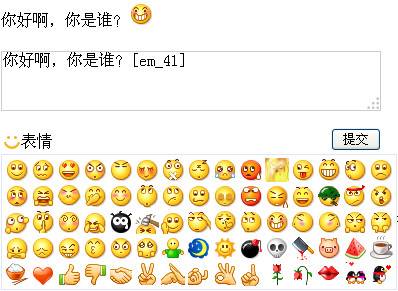
仿QQ评论留言插入表情的jquery插件,在输入框输入留言内容,点击输入框下面的表情按钮,会弹出装有很多表情的层,点击任意表情,然后点击提交按钮,即可插件效果。本表情插件完美兼容IE6,并且可以随意扩展或更换表情。
使用方法
1、在头部引入相关js代码和css代码(注意里面的注释说明):<script type="text/javascript" src="https://5.jimth.com/download/jquery/jquery-1.8.3.min.js"></script>
<script type="text/javascript" src="js/jquery.qqFace.js"></script>
<script type="text/javascript">
$(function(){
$('.emotion').qqFace({
id : 'facebox', //表情盒子的ID
assign:'saytext', //给那个控件赋值
path:'face/' //表情存放的路径
});
//点击提交按钮
$(".sub_btn").click(function(){
var str = $("#saytext").val();
if(str.length == 0){
alert("请输入内容!");
}else{
$("#show").html(replace_em(str)); //展示提交内容
$("#saytext").val("");//清空输入框
alert("提交成功!!");
}
});
});
//查看结果
function replace_em(str){
str = str.replace(/\</g,'<');
str = str.replace(/\>/g,'>');
str = str.replace(/\n/g,'<br/>');
str = str.replace(/\[em_([0-9]*)\]/g,'<img src="face/$1.gif" border="0" />');
return str;
}
</script>
<style type="text/css">
body,html{text-align:center;}
#main{margin:30px auto;width:400px;text-align:left;}
#show{width:380px; margin:20px auto}
.comment{width:380px; margin:20px auto; position:relative}
.comment h3{height:28px; line-height:28px}
.com_form{width:100%; position:relative}
.input{width:100%; height:60px; border:1px solid #ccc}
.sub_btn{float:right;}
.com_form p{height:28px; line-height:28px;}
/*以上css代码根据实际情况修改,以下css代码必须保留*/
span.emotion{width:60px; height:20px; overflow:hidden; background:url(images/icon.gif) no-repeat 2px 2px; padding-left:20px; cursor:pointer;}
span.emotion:hover{background-position:2px -28px;/*注意hover此属性在ie 6浏览器下是无效的*/}
.qqFace{margin-top:4px;background:#fff;padding:2px;border:1px #dfe6f6 solid;}
.qqFace table td{padding:0px;}
.qqFace table td img{cursor:pointer;border:1px #fff solid;}
.qqFace table td img:hover{border:1px #0066cc solid;}
</style>
2、把以下代码拷贝到你想引用的地方<div id="main">
<div id="show"></div>
<div class="comment">
<div class="com_form">
<textarea class="input" id="saytext" name="saytext"></textarea>
<p><input type="button" class="sub_btn" value="提交"><span class="emotion">表情</span></p>
</div>
</div>
</div>
3更换或者增删表情注意事项:1)表情图片放在face文件夹,命名为连续的数字,格式一定要是gif,否则不识别。
2)表情的尺寸最好统一,在24*24px左右最好,当然,过大过小也不是很要紧,只是太大,不利于预览。
3)本qq表情插件默认75个,如果要扩展,可以接着增加,但是需要在jquery.qqFace.js里面的“for(var i=1; i<=75; i++){”里面的“75”改成你最终扩展的数量。