
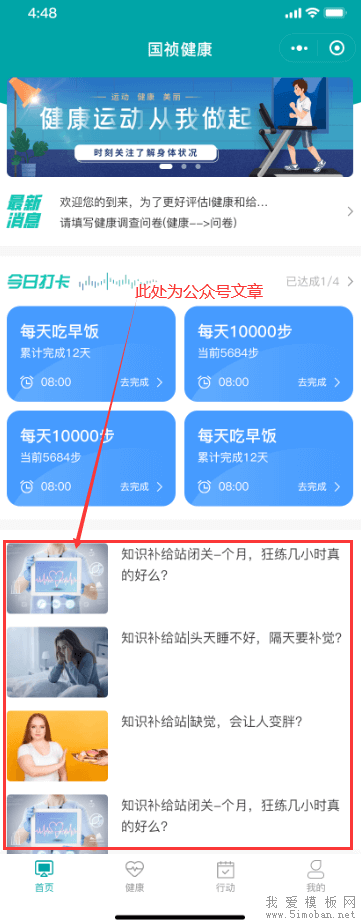
倒腾了一个小时,总算倒腾出来了,现在做下记录:
1、查看小程序和公众号是否绑定过:在 公众号->小程序管理 查看是否绑定了小程序,同时在 小程序->设置->关联设置->关联的公众号 查看是否关联了公众号。只有两者进行了绑定,才可能获取。
2、查看公众号是否有认证过。注意:个人公众号是无权限放开文章接口的。打开 https://developers.weixin.qq.com/doc/offiaccount/Getting_Started/Explanation_of_interface_privileges.html 可查看权限。在 公众号->认证详情 可以查看是否认证过。没有认证,或者个人账号,获取文章时会提示无权限:
errcode: 48001
errmsg: "api unauthorized hints: [2kLBmbXIRa-q0Irva!]"
3、获取access_token:
接口文档:https://developers.weixin.qq.com/doc/offiaccount/Basic_Information/Get_access_token.html
接口地址:https://api.weixin.qq.com/cgi-bin/token
参数:
{
        grant_type: 'client_credential',    //固定写死
        appid: 'xxxxxxxxx',    //注意,这里是公众号appid
        secret: 'xxxxxxxxxxxxxxxx',  //注意,这里是公众号的APPSecret
}
请求方式:get代码如下:
//获取token
wx.request({
  url: 'https://api.weixin.qq.com/cgi-bin/token',
  method:'get',
  data: {
    grant_type: 'client_credential',
    appid: 'xxxxxxxxxx',
    secret: 'xxxxxxxxxxxxxxxxxxxxxx',
  },
  header: {
    'content-type': 'application/json'
  },
  success(res) {
  }
})
注意:1、这里的appid和secret都是公众号的,不是小程序的,可以在公众号->基本配置 进行查看
2、要配置IP白名单,就在secret下面,否则无法获取
4、获取公众号文章列表(素材列表)
接口文档:https://developers.weixin.qq.com/doc/offiaccount/Asset_Management/Get_materials_list.html
接口地址:https://api.weixin.qq.com/cgi-bin/material/batchget_material
参数:
{
        "type": 'news',   //类型,可以使图文列表等,可查看接口文档
        "offset": 0,   //起始索引
        "count": 10    //获取数量,范围0-20
}
请求方式:post代码如下:
wx.request({
  url: 'https://api.weixin.qq.com/cgi-bin/material/batchget_material?access_token=' + access_token,  //access_token为上一步获取的access_token
  method: 'post',
  data: {
    "type": 'news',
    "offset": 0,
    "count": 10
  },
  header: {
    'content-type': 'application/json'
  },
  success(res) {
    console.log(res)
  }
})
最终代码:
//获取token
wx.request({
  url: 'https://api.weixin.qq.com/cgi-bin/token',
  method:'get',
  data: {
    grant_type: 'client_credential',
    appid: 'xxxxxxx',
    secret: 'xxxxxxxxxxxxxxxxxxxx',
  },
  header: {
    'content-type': 'application/json'
  },
  success(res) {
    //获取公众号素材列表
    let access_token = res.data.access_token;
    wx.request({
      url: 'https://api.weixin.qq.com/cgi-bin/material/batchget_material?access_token=' + access_token,
      method: 'post',
      data: {
        "type": 'news',
        "offset": 0,
        "count": 10
      },
      header: {
        'content-type': 'application/json'
      },
      success(res) {
        console.log(res)
      }
    })
  }
})