
jQuery实现的,多个容器(这里用的自定义的column,换成div同理)在一行,拖拽中间的分割线,实现调整其左右宽度容器宽度的功能,很实用。点击js拖拽控制容器大小查看效果。截图如下:
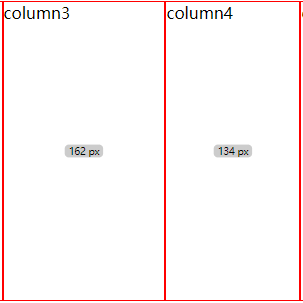
css代码:
*{
    box-sizing: border-box;
}
row{
    display: flex;
}
column{
    height: 300px;
    flex-shrink: 0;
    border: 1px solid red;
    width: 10%;
    position: relative;
}
column span{
    position: absolute;
    left: 50%;
    top: 50%;
    transform: translate(-50%, -50%) scale(.8);
    background-color: #ccc;
    font-size: 12px;
    padding: 2px 5px;
    line-height: 1;
    border-radius: 5px;
    user-select: none;
}
html代码如下:
<row>
    <column>column1</column>
    <column>column2</column>
    <column>column3</column>
    <column>column4</column>
    <column>column5</column>
</row>
js代码如下:
<script src="https://5.jimth.com/tpl/js/jquery-3.1.0.min.js"></script>
<script>
// 当前操作对象 和 下一个对象
var curObj, nextObj
// 鼠标按下时初始化当前要操作的列(当鼠标位置距离当前column右边框10像素以内时,再操作)
$('body').on('mousedown', 'column', function(e) {
    // 最后一个column,什么都不操作
    if($(this).next('column').get(0) === undefined) return
    if(($(this).outerWidth() - e.offsetX) < 10) {
        curObj = this
        curObj.initClientX = e.clientX
        curObj.initWidth = $(this).outerWidth()
        $(curObj).append('<span>'+parseInt(curObj.initWidth)+' px</span>')
        nextObj = $(this).next('column').get(0)
        nextObj.initWidth = $(nextObj).outerWidth()
        $(nextObj).append('<span>'+parseInt(nextObj.initWidth)+' px</span>')
    }
})
// 鼠标抬起时置空当前操作的列
$(document).mouseup(function() {
    if(curObj) {
        $(curObj).find('span').remove()
        $(nextObj).find('span').remove()
        curObj = null
    }
})
// 当鼠标位置距离当前column右边框10像素以内时改变鼠标指针
$('body').on('mousemove', 'column', function(e) {
    // 最后一个column,什么都不操作
    if($(this).next('column').get(0) === undefined) return
    if(($(this).outerWidth() - e.offsetX) < 10) {
        $(this).css('cursor','col-resize')
    }else{
        $(this).css('cursor','default');
    }
});
// 如果鼠标移动事件绑定在column上,当移动过快时会导致column的高度变化跟不上鼠标的移动变化
$(document).on('mousemove', function(e) {
    if(curObj && nextObj) {
        if((curObj.initWidth + (e.clientX - curObj.initClientX)) > 0) {
            $(curObj).outerWidth(curObj.initWidth + (e.clientX - curObj.initClientX))
            $(curObj).find('span').text(parseInt($(curObj).outerWidth()) + ' px')
            $(nextObj).outerWidth(nextObj.initWidth - (e.clientX - curObj.initClientX))
            $(nextObj).find('span').text(parseInt($(nextObj).outerWidth()) + ' px')
        }
    }
});
</script>
原理就是在拖拽过程中,计算出鼠标移动的距离,分别加到当前操作的dom和后面的dom的宽度上去(最后一个dom不执行操作)