
两种场景:
执行一次,相当于setTimeout
执行多次,相当于setInterval
这时,就需要用到Timer类,Timer类存在于dart:async内,所以我们需要先导入
import 'dart:async';Timer执行一次:
Timer 的构造也很简单,一个时长Duration 一个到时之后执行的任务callback,如下图
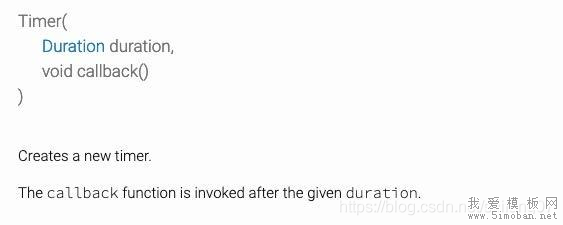
他的构造方法
const timeout = const Duration(seconds: 5);
print('currentTime ='+DateTime.now().toString());
Timer(timeout, () {
    //5秒后执行
    print('after 5s Time ='+DateTime.now().toString());
});
这里我们设置了超时时间为 5 秒。然后启动一个定时器,等到 5 秒时候到了,就会执行回调方法。我们在定时器启动之前和之后都加上了打印日志,控制台打印输出如下:
I/flutter (15245): currentTime =2019-07-17 13:58:52.281287 I/flutter (15245): after 5s Time =2019-07-17 13:58:57.284234Timer.periodic执行多次回调:
回调多次的定时器用法和回调一次的差不多,区别有下面两点:
1、API 调用不同
2、需要手动取消,否则会一直回调,因为是周期性的
int count = 0;
const period = const Duration(seconds: 1);
print('currentTime='+DateTime.now().toString());
Timer.periodic(period, (timer) {
  //到时回调
  print('afterTimer='+DateTime.now().toString());
  count++;
  if (count >= 5) {
    //取消定时器,避免无限回调
    timer.cancel();
    timer = null;
  }
});
这里我们的功能是每秒回调一次,当达到 5 秒后取消定时器,一共 回调了 5 次。控制台输出如下:
I/flutter (15245): currentTime=2019-07-17 14:07:21.147541
I/flutter (15245): afterTimer=2019-07-17 14:07:22.166514
I/flutter (15245): afterTimer=2019-07-17 14:07:23.165105
I/flutter (15245): afterTimer=2019-07-17 14:07:24.165862
I/flutter (15245): afterTimer=2019-07-17 14:07:25.167847
I/flutter (15245): afterTimer=2019-07-17 14:07:26.165679
注意⚠️:得在合适时机取消定时器,否则会一直回调
下面是利用Timer.periodic来实现获取验证码倒计时效果:
一、引入Timer对应的库
import 'dart:async';二、定义计时变量
class _LoginPageState extends State{
  ...
  Timer _timer;
  int _countdownTime = 0;
  ...
}
三、点击后开始倒计时这里我们点击发送验证码文字来举例说明。
GestureDetector(
  onTap: () {
    if (_countdownTime == 0 && validateMobile()) {
      //Http请求发送验证码
      ...
      setState(() {
        _countdownTime = 60;
      });
      //开始倒计时
      startCountdownTimer();
    }
  },
  child: Text(
    _countdownTime > 0 ? '$_countdownTime后重新获取' : '获取验证码',
    style: TextStyle(
      fontSize: 14,
      color: _countdownTime > 0
          ? Color.fromARGB(255, 183, 184, 195)
          : Color.fromARGB(255, 17, 132, 255),
    ),
  ),
)
四、倒计时的实现方法
void startCountdownTimer() {
    const oneSec = const Duration(seconds: 1);
    var callback = (timer) => {
        setState(() {
            if (_countdownTime < 1) {
                _timer.cancel();
            } else {
                _countdownTime = _countdownTime - 1;
            }
        })
    };
    _timer = Timer.periodic(oneSec, callback);
}
五、最后在dispose()取消定时器
@override
void dispose() {
  super.dispose();
  if (_timer != null) {
    _timer.cancel();
  }
}