
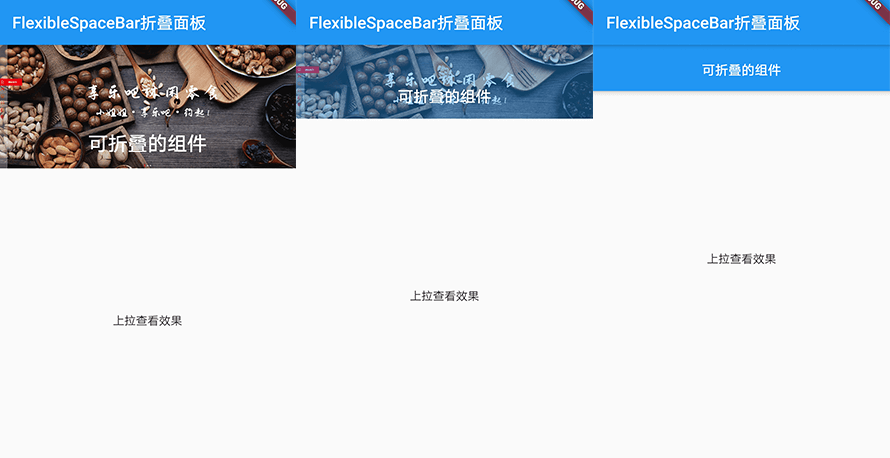
下面是代码:
class MyApp extends StatelessWidget {
  const MyApp({Key key}) : super(key: key);

  @override
  Widget build(BuildContext context) {
    return MaterialApp(
      title: 'FlexibleSpaceBar可折叠的应用栏',
      home: Scaffold(
        appBar: AppBar(
          title: Text('FlexibleSpaceBar可折叠的应用栏'),
        ),
        //支持可嵌套的滚动区域
        body: NestedScrollView(
            headerSliverBuilder:
                (BuildContext context, bool innerBoxIsScrolled) {
              return <Widget>[
                //应用栏
                SliverAppBar(
                  //展开高度
                  expandedHeight: 150.0,
                  //是否随着滑动隐藏标题
                  floating: false,
                  //标题是否固定在顶部
                  pinned: true,
                  //可折叠应用栏
                  flexibleSpace: FlexibleSpaceBar(
                    centerTitle: true,
                    title: Text(
                      '可折叠的组件',
                      style: TextStyle(color: Colors.white, fontSize: 16.0),
                    ),
                    background: Image.network(
                      'https://5.jimth.com/uploads/allimg/200613/1-2006130029330-L.png',
                      fit: BoxFit.cover,
                    ),
                  ),
                )
              ];
            },
            //内容
            body: Center(
              child: Text('上拉查看效果'),
            )),
      ),
    );
  }
}