
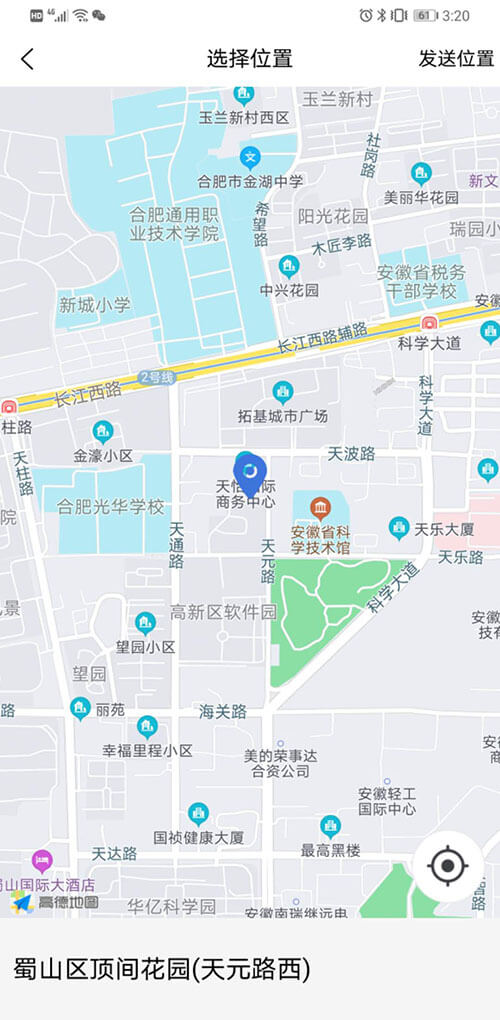
最终代码:
<map :style="[{width:mapWidth,height: mapHeight}]" :controls="controls" :latitude="latitude" :longitude="longitude" :markers="covers" @tap="getadd" @controltap="controltapfunc" @regionchange="regionchange" @updated="updatedmap"></map>
<text class="maptext-tex" :style="[{height: textheight,lineHeight:textheight}]">{{address}}</text>
export default {
    data() {
        return {
            id: 0, // 使用 marker点击事件 需要填写id
            mapWidth:"300rpx",
            mapHeight:"1000rpx",
            windowWidth:"",
            windowHeight:"",
            textwidth:"",
            textheight:"",
            title: 'map',
            latitude: '',
            longitude: '',
            covers: [],
            controls:[{//在地图上显示控件,控件不随着地图移动
                    id:111,//控件id
                    iconPath:'../../static/image/dingwei.png',//显示的图标
                    position:{//控件在地图的位置
                        left:0,
                        top:0,
                        width:60,
                        height:60,
                    },
                    clickable:true
            }],
            address:"",
        };
    },
    onLoad() {
        this.getSystemInfo()
        this.getlocation();//
    },
    onNavigationBarButtonTap(e) {
        var that = this
        uni.$emit('address', {
            address:that.address,
            latitude:that.latitude,
            longitude:that.longitude
        });
        uni.navigateBack({
            delta:1
        })

    },
    methods: {
        updatedmap:function(){
        },
        regionchange:function(e){
        },
        controltapfunc:function(e){
            this.getlocation();
        },
        getSystemInfo:function(){
            var that = this
            uni.getSystemInfo({
                success: function (res) {
                    that.windowWidth=res.windowWidth
                    that.windowHeight=res.windowHeight
                    that.mapWidth = that.windowWidth
                    that.mapHeight = that.windowHeight-80
                    that.textwidth = that.windowWidth
                    that.textheight = that.windowHeight-that.mapHeight
                    that.controls = [{//在地图上显示控件,控件不随着地图移动
                        id:111,//控件id
                        iconPath:'../../static/image/dingwei.png',//显示的图标
                        position:{//控件在地图的位置
                            left:that.mapWidth-70,
                            top:that.mapHeight-70,
                            width:60,
                            height:60
                        },
                        clickable:true
                    }]
                }
            });
        },
        getadd: function(res) {
            var that = this;
            that.latitude = res.detail.latitude
            that.longitude = res.detail.longitude
            that.covers = [
               {
                  latitude: res.detail.latitude,
                  longitude: res.detail.longitude,
                  iconPath: '../../static/image/biaoji.png',
                  width:40,
                  height:40
               }
            ]
            that.$forceUpdate()
            func.getLocation(res.detail.longitude,res.detail.latitude,function(result){
                that.address =result.data.result.formatted_addresses.recommend
            },function(err){
            })
            that.$forceUpdate();
        },
        //获取当前位置
        getlocation: function() {
            var that = this;
            uni.getLocation({
                type: 'gcj02',
                success: function(res) {
                    that.latitude = res.latitude;
                    that.longitude = res.longitude;
                    that.covers = [
                       {
                          latitude: res.latitude,
                          longitude: res.longitude,
                          iconPath: '../../static/image/biaoji.png',
                          width:40,
                          height:40
                       }
                    ]
                    //func.getLocation为封装的根据经纬度查询对应的地址的ajax方法
                    func.getLocation(res.longitude,res.latitude,function(result){
                        that.address = result.data.result.formatted_addresses.recommend
                    },function(err){
                    })
                    that.$forceUpdate();
                },
                fail:function(ret){
                    console.log(JSON.stringify(ret));
                }
            });
        }
    }
};
uni-app H5端的实现效果不一样,因为不支持点击地图得到经纬度,详情可查看 uni-app H5端实现移动地图显示当前地图中心位置的坐标和地址