
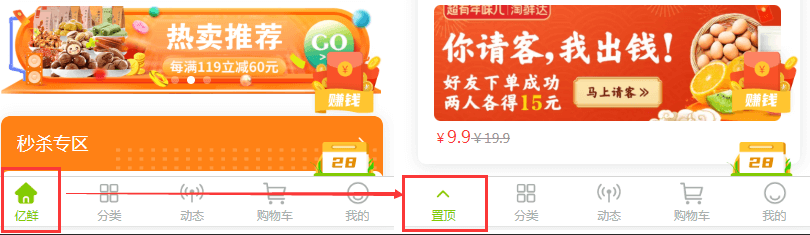
这个实现起来也很简单,下面是代码:
1、在data定义一个用来记录是否显示返回顶部的变量
data() {
    return {
        top: 0,
        isGoTop:false,
    }
},
2、置顶效果,即将tabbar变成返回顶部的代码,通过setTabBarItem设置第一个的样式即可:
setGoTop(){
    uni.setTabBarItem({
        index: 0,
        text: '置顶',
        iconPath: 'static/img/nav/gotop.png',
        selectedIconPath: 'static/img/nav/gotop.png'
    })
    this.isGoTop = true;
},
3、去除置顶效果,回复原来的效果
removeGoTop(){
    uni.setTabBarItem({
        index: 0,
        "iconPath": "static/img/nav/n1.png",
        "selectedIconPath": "static/img/nav/n1_active.png",
        "text": "亿鲜"
    })
    this.isGoTop = true;
},
4、返回顶部代码,即点击返回顶部,执行的代码
goTop(){
    uni.pageScrollTo({
        scrollTop: 0,
        duration: 100
    });
},
5、页面滚动监听,通过res返回的scrollTop和屏幕高度进行判断,超过一屏,就显示返回顶部,否则显示首页效果
onPageScroll(res){
    var scrollTop = res.scrollTop;
    if(scrollTop>getApp().globalData.screenHeight){
        this.setGoTop();
    }else{
        this.removeGoTop();
    }
},
6、tabbar点击监听
onTabItemTap(res){
    if(this.isGoTop){
        this.goTop();
        this.removeGoTop();
    }
}