
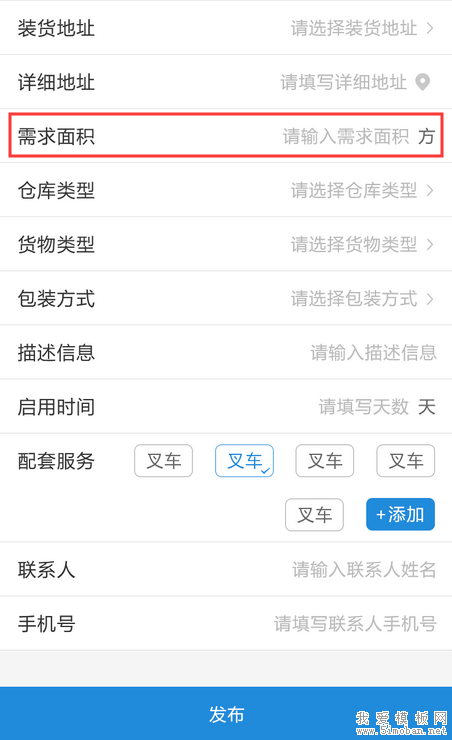
以画红框的为例,这明显是Row里面套TextField:
class ListItem2 extends StatelessWidget {
  @override
  Widget build(BuildContext context) {
    return Container(
      padding: EdgeInsets.fromLTRB(ScreenUtil().setWidth(30), 0, ScreenUtil().setWidth(30), 0),
      height: ScreenUtil().setHeight(88),
      width: ScreenUtil().setWidth(750),
      alignment: Alignment.center,
      decoration: BoxDecoration(
        border: Border(
          bottom: BorderSide(width: 1, color:Colors.black12)
        )
      ),
      child: Row(
        mainAxisAlignment: MainAxisAlignment.spaceBetween,
        children: <Widget>[
          Text(
            '需求面积',
            style:TextStyle(
              fontSize: ScreenUtil().setSp(30)
            ),
          ),
          Row(
            children: <Widget>[
              TextField(
                keyboardType: TextInputType.number,
                maxLines: 1,
                decoration: InputDecoration(
                  hintText: '请输入需求面积',
                  border: InputBorder.none
                ),
              ),
              Text(
                '方',
                style:TextStyle(
                  fontSize: ScreenUtil().setSp(28),
                  color: Color(0xFF666666),
                )
              )
            ],
          ),
        ],
      ),
    );
  }
}
但是,一运行就报了下面的错误:I/flutter ( 3346): ══╡ EXCEPTION CAUGHT BY RENDERING LIBRARY ╞═════════════════════════════════════════════════════════
I/flutter ( 3346): The following assertion was thrown during performLayout():
I/flutter ( 3346): An InputDecorator, which is typically created by a TextField, cannot have an unbounded width.
I/flutter ( 3346): This happens when the parent widget does not provide a finite width constraint. For example, if the
I/flutter ( 3346): InputDecorator is contained by a Row, then its width must be constrained. An Expanded widget or a
I/flutter ( 3346): SizedBox can be used to constrain the width of the InputDecorator or the TextField that contains it.
I/flutter ( 3346): 'package:flutter/src/material/input_decorator.dart':
I/flutter ( 3346): Failed assertion: line 910 pos 7: 'layoutConstraints.maxWidth < double.infinity'
I/flutter ( 3346): Either the assertion indicates an error in the framework itself, or we should provide substantially
I/flutter ( 3346): more information in this error message to help you determine and fix the underlying cause.
I/flutter ( 3346): In either case, please report this assertion by filing a bug on GitHub:
I/flutter ( 3346): https://github.com/flutter/flutter/issues/new?template=BUG.md
I/flutter ( 3346): Widget creation tracking is currently disabled. Enabling it enables improved error messages. It can
I/flutter ( 3346): be enabled by passing `--track-widget-creation` to `flutter run` or `flutter test`.
I/flutter ( 3346): When the exception was thrown, this was the stack:
I/flutter ( 3346): #2 _RenderDecoration._layout (package:flutter/src/material/input_decorator.dart:910:7)
I/flutter ( 3346): #3 _RenderDecoration.performLayout (package:flutter/src/material/input_decorator.dart:1214:44)
I/flutter ( 3346): #4 RenderObject.layout (package:flutter/src/rendering/object.dart:1701:7)
报错太长,就不都放上来了。
百度了好久没找到,再google找到了,说是在textFidle外面套个Expanded,即改造如下:
class ListItem2 extends StatelessWidget {
  @override
  Widget build(BuildContext context) {
    return Container(
      padding: EdgeInsets.fromLTRB(ScreenUtil().setWidth(30), 0, ScreenUtil().setWidth(30), 0),
      height: ScreenUtil().setHeight(88),
      width: ScreenUtil().setWidth(750),
      alignment: Alignment.center,
      decoration: BoxDecoration(
        border: Border(
          bottom: BorderSide(width: 1, color:Colors.black12)
        )
      ),
      child: Row(
        mainAxisAlignment: MainAxisAlignment.spaceBetween,
        children: <Widget>[
          Text(
            '需求面积',
            style:TextStyle(
              fontSize: ScreenUtil().setSp(30)
            ),
          ),
          Row(
            children: <Widget>[
              //在这里套了个Expanded
              Expanded(
                child: TextField(
                  keyboardType: TextInputType.number,  //数字键盘
                  maxLines: 1,
                  decoration: InputDecoration(
                    hintText: '请输入需求面积',
                    border: InputBorder.none
                  ),
                ),
              ),
              Text(
                '方',
                style:TextStyle(
                  fontSize: ScreenUtil().setSp(28),
                  color: Color(0xFF666666),
                )
              )
            ],
          ),
        ],
      ),
    );
  }
}
一运行,还是报相同的错误。以为这种方法不行,找了半天,还没找到。死马当活马医,就把TextField外层的Row也给套上,因为这个Row外面还有个Row,代码如下:
class ListItem2 extends StatelessWidget {
  @override
  Widget build(BuildContext context) {
    return Container(
      padding: EdgeInsets.fromLTRB(ScreenUtil().setWidth(30), 0, ScreenUtil().setWidth(30), 0),
      height: ScreenUtil().setHeight(88),
      width: ScreenUtil().setWidth(750),
      alignment: Alignment.center,
      decoration: BoxDecoration(
        border: Border(
          bottom: BorderSide(width: 1, color:Colors.black12)
        )
      ),
      child: Row(
        mainAxisAlignment: MainAxisAlignment.spaceBetween,
        children: <Widget>[
          Text(
            '需求面积',
            style:TextStyle(
              fontSize: ScreenUtil().setSp(30)
            ),
          ),
          //在这里也套了个Expanded
          Expanded(
            child: Row(
              children: <Widget>[
              	//在这里套了个Expanded
                Expanded(
                  child: TextField(
                    keyboardType: TextInputType.number,  //数字键盘
                    maxLines: 1,
                    decoration: InputDecoration(
                      hintText: '请输入需求面积',
                      border: InputBorder.none
                    ),
                  ),
                ),
                Text(
                  '方',
                  style:TextStyle(
                    fontSize: ScreenUtil().setSp(28),
                    color: Color(0xFF666666),
                  )
                )
              ],
            ),
          )
        ],
      ),
    );
  }
}
再次运行,发现效果出来了,这个问题困扰了我一个多小时,在这里记下,免得下次再犯。