
vue3父子组件传值主要有:
emit、
props、
provide和inject、
作用域插槽
下面详细记录下这几种方法:
1.emit
子组件:
<template>
  <div>
    子组件: <button @click="childEmit">传值给父组件</button>
  </div>
</template>
<script>
export default {
    setup(props,{emit}){ //分解context对象取出emit
        function childEmit(){
            emit('my-emit','我是子组件值')
        }
        return{
            childEmit
        }
    }
};
</script>
父组件:
<template>
  <div>
    父组件 <child @my-emit="parentEmit"></child>
  </div>
</template>

<script>
import Child from "./Child.vue";
import { ref } from "vue";
export default {
  components: {
    Child,
  },
  setup() {
    function parentEmit(val){
        alert(val)
    }
    return{
        parentEmit
    }
  },
};
</script>
运行结果:

Vue3的setup函数提供了两个参数 props和 context
| 参数 | value值 |
| props | 不可变的组件参数 |
| context | Vue3暴露出来的属性(emit,slots,attrs) |
2.props
子组件:
<template>
    <div>
        <div>{{msg}}</div>
        <div>{{str}}</div>
    </div>
</template>
<script>
import {computed} from 'vue'
export default {
    props:{
        msg:String
    },
    setup(props){//提供的函数props直接用就完事了嗷~~~
        const str = computed(()=>{
            return '父组件值为:'+ props.msg
        })
        return{
            str
        }
    }
}
</script>
父组件:
<template>
    <child :msg="msg"></child>
</template>
<script>
import Child from './Child.vue'
import {ref} from 'vue'
export default {
    components:{
        Child
    },
    setup(){
        const msg = ref('I am father value!')
        return{
            msg
        }
    }
}
</script>
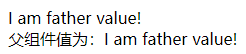
运行结果:
3.provide和inject
子组件:
<template>
    <div>
        <h1>{{ofMsg.msg}}</h1>
    </div>
</template>
<script>
import {inject,ref} from 'vue'
export default {
    setup(){
        const ofMsg = inject('proMsg',ref('none'))
        return{
            ofMsg
        }
    }
}
</script>
父组件:
<template>
    <child ref="HelloWorld"></child>
</template>
<script>
import Child from './Child.vue'
import {reactive,provide} from 'vue'
export default {
    components:{
        Child
    },
    setup(){
        const state = reactive({msg:'1234'})
        provide('proMsg',state)
        return{
            state
        }
    }
}
</script>
4、作用域插槽
子组件:
<template>
  <div>
    <h3>这是 TEST 组件</h3>
    <slot :info="infomation" :msg="message"></slot>
  </div>
</template>
<script>
export default {
  name: 'MyTest',
  data() {
    return {
      infomation: {
        phone: '138xxxx6666',
        address: '中国北京',
      },
      message: 'abc'
    }
  },
}
</script>
父组件:
<template>
  <div>
    <!-- 使用自定义组件 -->
    <my-test>
      <!-- 直接解构组件MyTest 返回的数据-->
      <template #default="{ msg, info }">
        <p>{{ msg }}</p>
        <p>{{ info.address }}</p>
      </template>
    </my-test>
  </div>
</template>
<script>
// 导入组件
import MyTest from './MyTest.vue'
export default {
  name: 'MyApp',
  // 注册组件
  components: {
    MyTest,
  },
}
</script>