
我爱模板网用form-create-designer做一个自定义表单时,客户的需求是加上一个部门选择器,可以实现从左侧拉去一个“部门选择器”的组件,就能直接选择公司的所属部门:
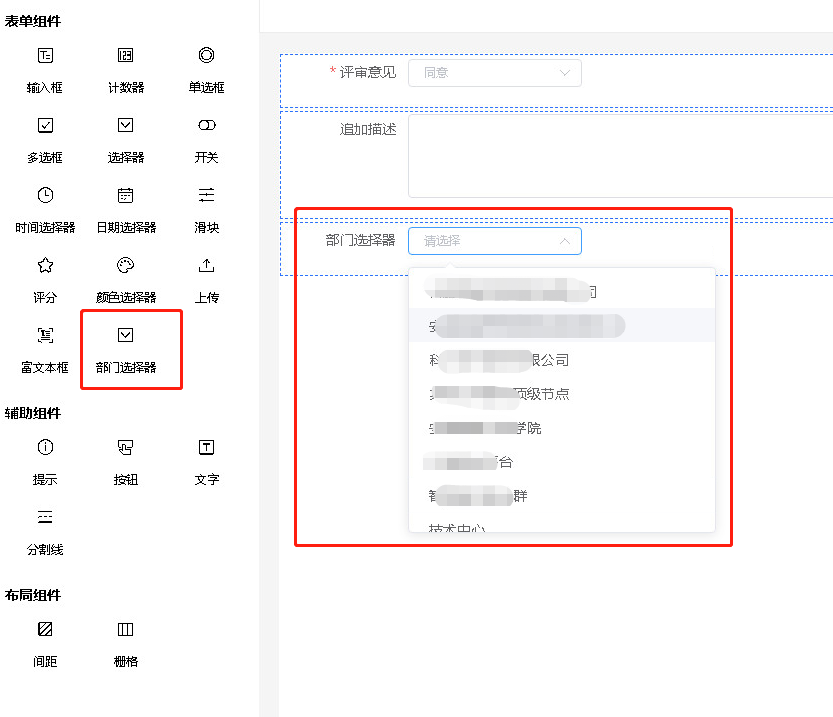
根据form-create-design官网的方法(http://designer.form-create.com/guide/component.html),通过下面的步骤实现了:
1、新建departmentSelector.js:
const departmentSelector = (list) => {
    const label = '部门选择器';
    const name = 'select';
    let i = 1;
    const uniqueId = ()=>`uni${i++}`;
    return {
        //拖拽组件的图标
        icon: 'icon-select',
        //拖拽组件的名称
        label,
        //拖拽组件的 key
        name,
        value:[],
        //拖拽组件的生成规则
        rule() {
            //如果在 props 方法中需要修改 rule 的属性,需要提前在 rule 上定义对应的属性
            return {
                type: name,
                field: uniqueId(),
                title: label,
                info: '',
                effect: {
                    fetch: ''
                },
                props: {
                    // filterable: true,
                },
                options: list
            };
        },
        //拖拽组件配置项(props)的生成规则
        props() {
            return [
                //生成`checkbox`组件的`options`配置规则
                // FcDesigner.makeOptionsRule('options'),
                {type: 'input', field: 'placeholder', title: '输入框占位文本'},
                {
                    type: 'switch',
                    field: 'disabled',
                    title: '是否禁用'
                },
                {
                    type: 'switch',
                    field: 'filterable',
                    title: '是否开启搜索'
                },
                {
                    type: 'select',
                    field: 'size',
                    title: '尺寸',
                    options: [{label: 'medium', value: 'medium'}, {label: 'small', value: 'small'}, {
                        label: 'mini',
                        value: 'mini'
                    }]
                },
            ];
        }
    }
};
export default departmentSelector
2、调用form-create-design的页面插入刚才定义的部门选择器(部分主要代码):
<script>
import departmentSelector from './departmentSelector'
export default {
  props: ['id']
  data() {
    return {
    depList: [] // depList 为接口获取的部门数据,经过组装成了[{label: '', value: ''}]形式,以便于select使用
    }
  },
  created(){
    const departmentSelectorOption = departmentSelector(this.depList)
    this.$nextTick(() => {
      // 添加插件
      this.$refs.designer.addComponent(departmentSelectorOption);
      // 插入拖拽按钮到`main`分类下
      this.$refs.designer.appendMenuItem('main', {
        icon: departmentSelectorOption.icon,
        name: departmentSelectorOption.name,
        label: departmentSelectorOption.label
      })
    })
    // 回显代码等省略...
  }
}
</script>
但是,客户忽然提出一个问题,那就是所有的select组件,label都变成了“部门选择器”,下拉选项都变成了刚才获取的部门列表。我一听便感觉是不是自定义的部门选择器覆盖了原先的select。经过调试,发现不能按照官方的自定义组件照抄:
上面的代码,直接一个“const name = 'select';”,将组件的name、rule里的type都替换成了select,这是错误的做法,这个覆盖原来的select,rule的type决定了组件是什么类型,所以这里必须是select,但是组件的name必须是唯一的,否则会覆盖同名组件,所以,应该起个别的名字,如“depSelect”等,最终修改的代码如下:
const departmentSelector = (list) => {
    const label = '部门选择器';
    // 将这里的name重新命名
    const name = 'depSelect';
    let i = 1;
    const uniqueId = ()=>`uni${i++}`;
    return {
        //拖拽组件的图标
        icon: 'icon-select',
        //拖拽组件的名称
        label,
        //拖拽组件的 key
        name,
        value:[],
        //拖拽组件的生成规则
        rule() {
            //如果在 props 方法中需要修改 rule 的属性,需要提前在 rule 上定义对应的属性
            return {
                // 这里必须是select
                type: 'select',
            // 后面代码省略...
        }
        // 后面代码省略...
    }
    // 后面代码省略...
}