
在使用官方生物认证之前,需要在manifest.json文件中进行如下的配置:
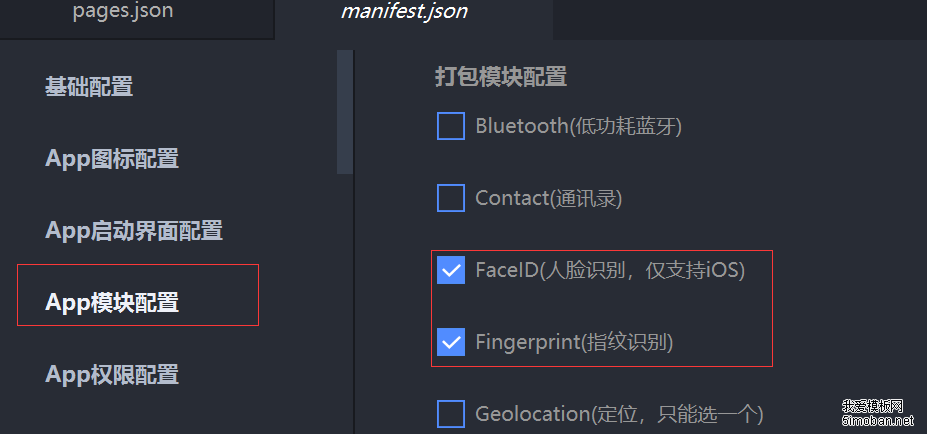
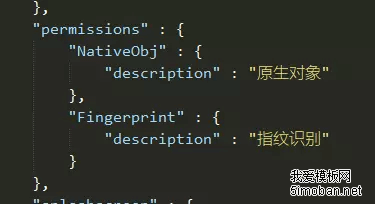
实现方式:
uni.checkIsSupportSoterAuthentication: 获取本机支持认证方式,res.supportMode = ['fingerPrint'] 只支持指纹识别,res.supportMode = ['fingerPrint', 'facial'] 支持指纹识别和人脸识别。
uni.checkIsSoterEnrolledInDevice: 获取设备内是否录入指纹信息
uni.startSoterAuthentication:开始SOTER生物认证
具体实现代码及注释如下:
<template>
    <view>
        <view>{{ result }}</view>
    </view>
 </template>

<script>
export default {
    data() {
        return {
            result: ''
        }
    },
    onLoad() {
        this.checkIsSupportSoterAuthentication()
    },
    methods: {
        /**
         * uni.checkIsSupportSoterAuthentication:  获取本机支持认证方式(
         *         res.supportMode = ['fingerPrint'] 只支持指纹识别
         *         res.supportMode = [] 不具备任何被SOTER支持的生物识别方式
         *         res.supportMode = ['fingerPrint', 'facial'] 支持指纹识别和人脸识别
         * )
         * 需求:当前业务只要求指纹识别功能,(如你的业务中需要人脸识别,此方法也可以验证)
         *
        */
        checkIsSupportSoterAuthentication() {
            // #ifdef APP-PLUS || MP-WEIXIN
            uni.checkIsSupportSoterAuthentication({
                success(res) {
                    console.log(res);
                    // 如果当前设备支持生物识别方式,且支持指纹识别方式
                    if (res.supportMode && res.supportMode.includes('fingerPrint')) {
                        /**
                         * uni.checkIsSoterEnrolledInDevice : 获取设备内是否录入指纹信息
                         *  checkAuthMode: 'fingerPrint', // 检验指纹信息
                         * */
                        uni.checkIsSoterEnrolledInDevice({
                            checkAuthMode: 'fingerPrint', // 检验指纹信息
                            success(res) {
                                console.log(res.isEnrolled)
                                if (res.isEnrolled == true) {
                                    /**
                                     * 开始 SOTER 生物认证
                                     * 执行成功,进行后续操作
                                     * */
                                    uni.startSoterAuthentication({
                                        requestAuthModes: ['fingerPrint'],
                                        challenge: '123456',
                                        authContent: '请用指纹解锁',
                                        success(res) {
                                            console.log(res);
                                            uni.showToast({
                                                title: "识别成功",
                                                duration: 5000,
                                                icon: 'none'
                                            })
                                            //指纹识别成功后,进行后续工作
                                        },
                                        fail(err) {
                                            console.log(err, '66666666666666666');
                                        },
                                        complete(res) {
                                            console.log(res);
                                        }
                                    })
                                } else {
                                    this.result = '此设备未录入指纹,请到设置中开启';
                                }
                            },
                            fail(err) {
                                uni.showModal({
                                    title: '温馨提示',
                                    content: '此设备未录入指纹,请到设置中开启',
                                    showCancel: false,
                                    success: function(res) {
                                        // 进行后续逻辑
                                    }
                                })
                            }
                        })
                    } else {
                        this.result = "此设备不支持指纹识别功能"
                    }
                },
                fail(err) {
                    uni.showModal({
                        title: '温馨提示',
                        content: '此设备不支持指纹识别功能',
                        showCancel: false,
                        success: function(res) {
                            // 进行后续逻辑
                        }
                    })
                }
            })
            // #endif

            // #ifndef APP-PLUS || MP-WEIXIN
            this.result = '此平台不支持指纹识别';
            // #endif
        }
    }
}
</script>